> ## Documentation Index
> Fetch the complete documentation index at: https://docs.browseros.com/llms.txt
> Use this file to discover all available pages before exploring further.
# Contributing to BrowserOS
> Guide to contributing to BrowserOS
BrowserOS has two main parts you can contribute to:
* **Agent** — The AI features, UI, and browser automation (TypeScript/React)
* **Browser** — The custom Chromium build (C++/Python)
Most contributors work on the Agent since it's much easier to set up.
## Quick Links
* [GitHub Repository](https://github.com/BrowserOS-ai/BrowserOS)
* [Discord Community](https://discord.gg/YKwjt5vuKr)
* [Report Issues](https://github.com/BrowserOS-ai/BrowserOS/issues)
## Ways to Contribute
**Report bugs** — [Open an issue](https://github.com/browseros-ai/BrowserOS/issues/new) with steps to reproduce, expected vs actual behavior, and screenshots.
**Suggest features** — Share ideas on [GitHub](https://github.com/browseros-ai/BrowserOS/issues/99) or [Discord](https://discord.gg/YKwjt5vuKr).
**Improve docs** — Docs live in `docs/` and use Mintlify. Edit pages and update `docs/docs.json` for navigation.
***
## Path 1: Agent Development
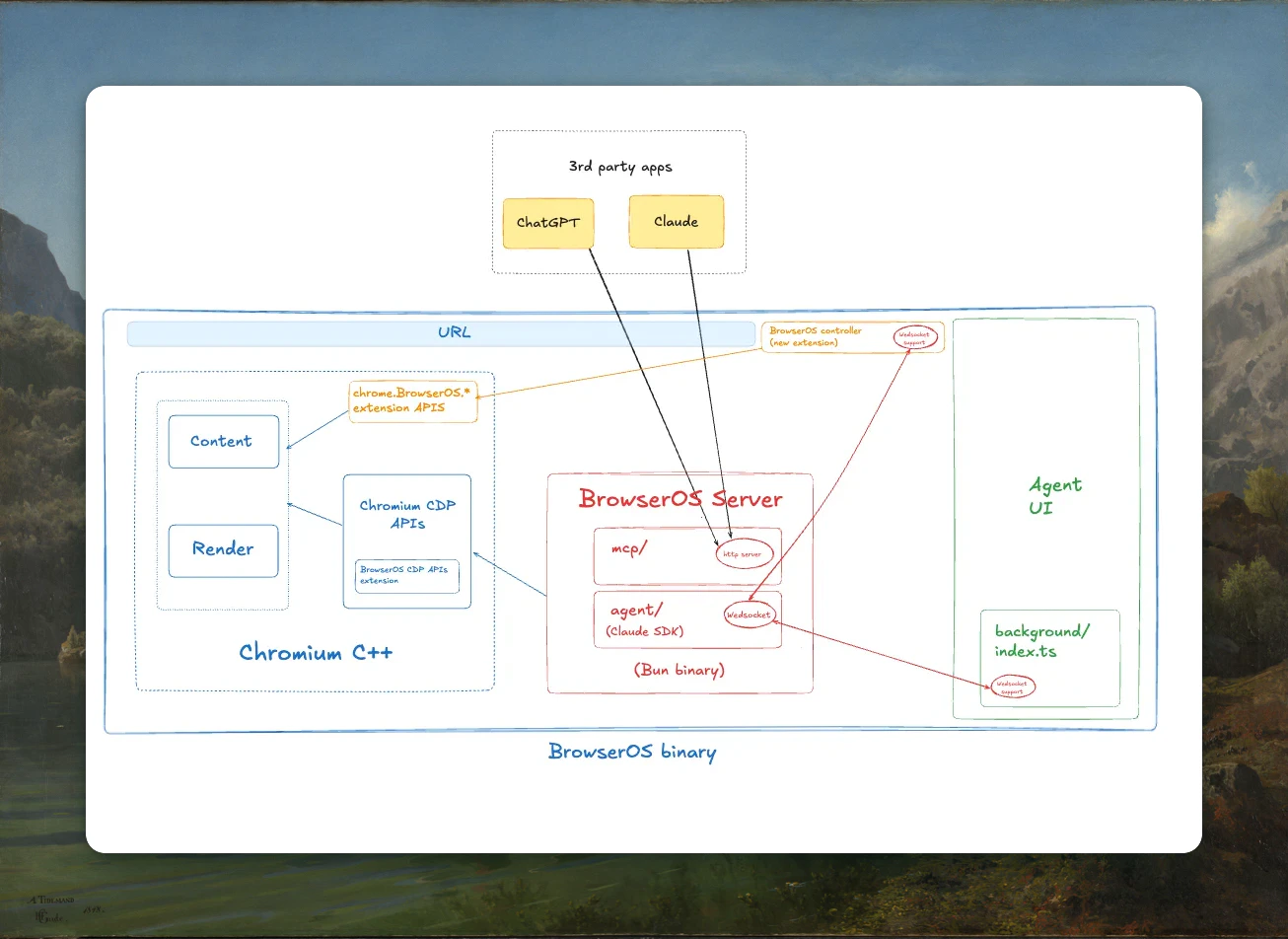
The Agent is a monorepo with 3 components:
| Component | Path | What it does |
| -------------- | --------------------- | -------------------------------------------------------- |
| **Agent UI** | `apps/app` | Chrome extension — chat interface, settings, side panel |
| **Server** | `apps/server` | Bun server — agent loop, MCP tools, API endpoints |
| **Controller** | `apps/controller-ext` | Chrome extension — bridges `chrome.*` APIs to the server |
### Architecture
 ### Setup
```bash theme={null}
# Clone the repo
git clone https://github.com/YOUR-USERNAME/BrowserOS.git
cd BrowserOS/packages/browseros-agent
# Install dependencies
bun install
# Copy environment files
cp apps/server/.env.example apps/server/.env.development
cp apps/app/.env.example apps/app/.env.development
```
### Running Locally
```bash theme={null}
# Terminal 1: Start the server
bun run start:server
# Terminal 2: Start the agent extension (dev mode)
bun run start:agent
```
Then load the extension in BrowserOS:
1. Go to `chrome://extensions/`
2. Enable **Developer mode**
3. Click **Load unpacked** and select the `apps/app/dist/` folder
### Commands
| Command | Description |
| ---------------------- | -------------------------------- |
| `bun run start:server` | Start the server |
| `bun run start:agent` | Start agent extension (dev mode) |
| `bun run build:server` | Build server for production |
| `bun run build:agent` | Build agent extension |
| `bun run build:ext` | Build controller extension |
| `bun run test` | Run tests |
| `bun run lint` | Check with Biome |
| `bun run typecheck` | TypeScript check |
***
## Path 2: Browser Development
Only go down this path if you're working on Chromium-level features like patches to the browser itself.
**Requirements:**
* \~100GB disk space
* 16GB+ RAM recommended
* 3+ hours for first build
### Prerequisites
* macOS with Xcode and Command Line Tools
* Python 3.12+
* [UV](https://docs.astral.sh/uv/) (Python package manager)
* Git
* Ubuntu 20.04+ or similar
* build-essential package
* Python 3.12+
* [UV](https://docs.astral.sh/uv/)
* Git
* Windows 10/11
* Visual Studio 2022 with C++ workload
* Python 3.12+
* [UV](https://docs.astral.sh/uv/)
* Git
### Build Instructions
**1. Clone Chromium source**
Follow the official [Chromium: Get the Code](https://www.chromium.org/developers/how-tos/get-the-code/) guide. This sets up `depot_tools` and fetches \~100GB of source code.
Note the path where you clone it (e.g., `~/chromium/src`).
**2. Install UV and dependencies**
```bash theme={null}
# Install UV
curl -LsSf https://astral.sh/uv/install.sh | sh
# Navigate to build system
cd packages/browseros
# Install dependencies
uv sync
```
**3. Build debug version**
```bash theme={null}
uv run browseros build \
--chromium-src \
--setup \
--prep \
--build \
--build-type debug
```
The `--setup` and `--prep` flags are only needed for the first build. After that, just use `--build` for incremental builds:
```bash theme={null}
uv run browseros build --chromium-src --build --build-type debug
```
**4. Run BrowserOS**
```bash theme={null}
/out/Default_arm64/BrowserOS\ Dev.app/Contents/MacOS/BrowserOS\ Dev \
--enable-logging=stderr \
--use-mock-keychain \
--user-data-dir=/tmp/test-profile
```
```bash theme={null}
/out/Default_x64/BrowserOS\ Dev.app/Contents/MacOS/BrowserOS\ Dev \
--enable-logging=stderr \
--use-mock-keychain \
--user-data-dir=/tmp/test-profile
```
```bash theme={null}
\out\Default_x64\BrowserOS Dev.exe \
--enable-logging=stderr \
--user-data-dir=%TEMP%\test-profile
```
```bash theme={null}
/out/Default_x64/browseros \
--enable-logging=stderr \
--user-data-dir=/tmp/test-profile
```
### Build Flags
| Flag | Description |
| ---------------- | ---------------------------------- |
| `--chromium-src` | Path to Chromium source directory |
| `--setup` | Run setup phase (first build only) |
| `--prep` | Run prep phase (first build only) |
| `--build` | Run the compile phase |
| `--build-type` | `debug` or `release` |
| `--sign` | Sign the build |
| `--package` | Package for distribution |
### Troubleshooting
**Build fails with missing dependencies** — Make sure you followed all steps from the Chromium build guide for your platform.
**Out of disk space** — Chromium needs \~100GB. Check with `df -h`.
**Build takes too long** — Use ccache, more CPU cores, or stick to debug builds.
**UV command not found** — Restart your terminal after installing UV.
***
## Making Your First PR
1. **Fork** the repository on GitHub
2. **Clone** your fork locally
3. **Create a branch**: `git checkout -b feature/your-feature`
4. **Make changes** and test them
5. **Commit**: `git commit -m "feat: add your feature"`
6. **Push**: `git push origin feature/your-feature`
7. **Open a PR** with a clear description
### Sign the CLA
On your first PR, our bot will ask you to sign the Contributor License Agreement. Just comment:
```
I have read the CLA Document and I hereby sign the CLA
```
***
## Code Standards
**TypeScript:**
* Use strict typing, avoid `any`
* Use Zod schemas instead of TypeScript interfaces
* Use path aliases (`@/lib`) not relative paths (`../`)
* Naming: `PascalCase` for classes, `camelCase` for functions
**React:**
* Tailwind CSS only (no SCSS or CSS modules)
* Hooks at top level only
* Test with Vitest
**General:**
* Keep functions short (under 20 lines)
* Write tests for new features
* Handle errors gracefully
***
## Getting Help
* **Discord** — [discord.gg/YKwjt5vuKr](https://discord.gg/YKwjt5vuKr)
* **GitHub Issues** — [github.com/BrowserOS-ai/BrowserOS/issues](https://github.com/BrowserOS-ai/BrowserOS/issues)
* **GitHub Discussions** — [github.com/BrowserOS-ai/BrowserOS/discussions](https://github.com/BrowserOS-ai/BrowserOS/discussions)
***
By contributing, you agree that your contributions will be licensed under AGPL-3.0.
### Setup
```bash theme={null}
# Clone the repo
git clone https://github.com/YOUR-USERNAME/BrowserOS.git
cd BrowserOS/packages/browseros-agent
# Install dependencies
bun install
# Copy environment files
cp apps/server/.env.example apps/server/.env.development
cp apps/app/.env.example apps/app/.env.development
```
### Running Locally
```bash theme={null}
# Terminal 1: Start the server
bun run start:server
# Terminal 2: Start the agent extension (dev mode)
bun run start:agent
```
Then load the extension in BrowserOS:
1. Go to `chrome://extensions/`
2. Enable **Developer mode**
3. Click **Load unpacked** and select the `apps/app/dist/` folder
### Commands
| Command | Description |
| ---------------------- | -------------------------------- |
| `bun run start:server` | Start the server |
| `bun run start:agent` | Start agent extension (dev mode) |
| `bun run build:server` | Build server for production |
| `bun run build:agent` | Build agent extension |
| `bun run build:ext` | Build controller extension |
| `bun run test` | Run tests |
| `bun run lint` | Check with Biome |
| `bun run typecheck` | TypeScript check |
***
## Path 2: Browser Development
Only go down this path if you're working on Chromium-level features like patches to the browser itself.
**Requirements:**
* \~100GB disk space
* 16GB+ RAM recommended
* 3+ hours for first build
### Prerequisites
* macOS with Xcode and Command Line Tools
* Python 3.12+
* [UV](https://docs.astral.sh/uv/) (Python package manager)
* Git
* Ubuntu 20.04+ or similar
* build-essential package
* Python 3.12+
* [UV](https://docs.astral.sh/uv/)
* Git
* Windows 10/11
* Visual Studio 2022 with C++ workload
* Python 3.12+
* [UV](https://docs.astral.sh/uv/)
* Git
### Build Instructions
**1. Clone Chromium source**
Follow the official [Chromium: Get the Code](https://www.chromium.org/developers/how-tos/get-the-code/) guide. This sets up `depot_tools` and fetches \~100GB of source code.
Note the path where you clone it (e.g., `~/chromium/src`).
**2. Install UV and dependencies**
```bash theme={null}
# Install UV
curl -LsSf https://astral.sh/uv/install.sh | sh
# Navigate to build system
cd packages/browseros
# Install dependencies
uv sync
```
**3. Build debug version**
```bash theme={null}
uv run browseros build \
--chromium-src \
--setup \
--prep \
--build \
--build-type debug
```
The `--setup` and `--prep` flags are only needed for the first build. After that, just use `--build` for incremental builds:
```bash theme={null}
uv run browseros build --chromium-src --build --build-type debug
```
**4. Run BrowserOS**
```bash theme={null}
/out/Default_arm64/BrowserOS\ Dev.app/Contents/MacOS/BrowserOS\ Dev \
--enable-logging=stderr \
--use-mock-keychain \
--user-data-dir=/tmp/test-profile
```
```bash theme={null}
/out/Default_x64/BrowserOS\ Dev.app/Contents/MacOS/BrowserOS\ Dev \
--enable-logging=stderr \
--use-mock-keychain \
--user-data-dir=/tmp/test-profile
```
```bash theme={null}
\out\Default_x64\BrowserOS Dev.exe \
--enable-logging=stderr \
--user-data-dir=%TEMP%\test-profile
```
```bash theme={null}
/out/Default_x64/browseros \
--enable-logging=stderr \
--user-data-dir=/tmp/test-profile
```
### Build Flags
| Flag | Description |
| ---------------- | ---------------------------------- |
| `--chromium-src` | Path to Chromium source directory |
| `--setup` | Run setup phase (first build only) |
| `--prep` | Run prep phase (first build only) |
| `--build` | Run the compile phase |
| `--build-type` | `debug` or `release` |
| `--sign` | Sign the build |
| `--package` | Package for distribution |
### Troubleshooting
**Build fails with missing dependencies** — Make sure you followed all steps from the Chromium build guide for your platform.
**Out of disk space** — Chromium needs \~100GB. Check with `df -h`.
**Build takes too long** — Use ccache, more CPU cores, or stick to debug builds.
**UV command not found** — Restart your terminal after installing UV.
***
## Making Your First PR
1. **Fork** the repository on GitHub
2. **Clone** your fork locally
3. **Create a branch**: `git checkout -b feature/your-feature`
4. **Make changes** and test them
5. **Commit**: `git commit -m "feat: add your feature"`
6. **Push**: `git push origin feature/your-feature`
7. **Open a PR** with a clear description
### Sign the CLA
On your first PR, our bot will ask you to sign the Contributor License Agreement. Just comment:
```
I have read the CLA Document and I hereby sign the CLA
```
***
## Code Standards
**TypeScript:**
* Use strict typing, avoid `any`
* Use Zod schemas instead of TypeScript interfaces
* Use path aliases (`@/lib`) not relative paths (`../`)
* Naming: `PascalCase` for classes, `camelCase` for functions
**React:**
* Tailwind CSS only (no SCSS or CSS modules)
* Hooks at top level only
* Test with Vitest
**General:**
* Keep functions short (under 20 lines)
* Write tests for new features
* Handle errors gracefully
***
## Getting Help
* **Discord** — [discord.gg/YKwjt5vuKr](https://discord.gg/YKwjt5vuKr)
* **GitHub Issues** — [github.com/BrowserOS-ai/BrowserOS/issues](https://github.com/BrowserOS-ai/BrowserOS/issues)
* **GitHub Discussions** — [github.com/BrowserOS-ai/BrowserOS/discussions](https://github.com/BrowserOS-ai/BrowserOS/discussions)
***
By contributing, you agree that your contributions will be licensed under AGPL-3.0.