> ## Documentation Index
> Fetch the complete documentation index at: https://docs.browseros.com/llms.txt
> Use this file to discover all available pages before exploring further.
# Bring Your Own LLM
> Connect your own AI models to BrowserOS
BrowserOS includes a default AI model you can use right away, but it has strict rate limits. For the best experience, bring your own API keys or run models locally.
See how to connect your own LLM in under a minute:
## Use Your Existing Subscription
Already paying for ChatGPT Pro or GitHub Copilot? Connect your existing account to BrowserOS with a single sign-in — no API keys, no extra cost.
**ChatGPT Pro / Plus**
Sign in with your OpenAI account. Access GPT-5 Codex, GPT-5.4, and the full Codex lineup with up to 400K context.
**GitHub Copilot**
Sign in with your GitHub account. Access 19+ models including Claude, GPT-5, and Gemini through one subscription.
***
## Which Model Should I Use?
| Mode | What works | Recommendation |
| -------------- | -------------------------- | -------------------------------------------------- |
| **Chat Mode** | Any model, including local | Ollama or Gemini Flash |
| **Agent Mode** | Cloud models only | Claude Opus 4.5, GPT-5, or Kimi K2.5 (open source) |
**Local LLMs aren't powerful for most agentic tasks yet.** They're great for Chat — asking questions about a page, summarizing, etc. But agent tasks need strong reasoning to click the right elements and handle multi-step workflows. Use Claude Opus 4.5, GPT-5, or Kimi K2.5 for agents.
***
## Kimi K2.5 — In Partnership with Moonshot AI
BrowserOS has partnered with [Moonshot AI](https://www.kimi.com) to bring **Kimi K2.5** as a first-class provider. Kimi K2.5 is now the **recommended model** in BrowserOS and is set as the default provider.
For a limited time, BrowserOS users get **extended usage limits** powered by Kimi K2.5. This means you can use the AI agent, chat, and other AI-powered features with increased limits at no cost.
Fully open-source model you can inspect and trust.
Supports images out of the box, including screenshots and visual context.
Strong reasoning for browser automation, form filling, and multi-step workflows.
Excellent agentic performance at a fraction of the cost of other frontier models.
### Why Kimi K2.5?
Kimi K2.5 offers excellent performance for agentic tasks at a fraction of the cost of other frontier models. It supports images, has a 128,000 token context window, and delivers strong results on browser automation tasks. Combined with BrowserOS's open-source agent framework, this makes for a powerful and affordable AI browsing experience.
### Bring Your Own Kimi API Key
You can also bring your own Kimi API key if you want to use Kimi K2.5 beyond the extended usage period, or if you want your own dedicated limits.
**Get your API key:**
1. Go to [platform.moonshot.ai](https://platform.moonshot.ai) and create an account
2. Navigate to the **API keys** section in your dashboard
3. Click **Create new API key** and copy the key
**Add to BrowserOS:**
1. Go to `chrome://browseros/settings`
2. Click **USE** on the **Moonshot AI** card
3. Enter your API key (it will be encrypted and stored locally on your machine)
4. The model is pre-configured to `kimi-k2.5` with a 128,000 context window
5. Click **Save**
The base URL for the Kimi API (`https://api.moonshot.ai/v1`) is pre-filled automatically when you select the Moonshot AI provider template.
***
## Cloud Providers
Connect to powerful AI models using your API keys. Your keys stay on your machine — requests go directly to the provider.
Gemini Flash is fast and free. Google gives you 20 requests per minute at no cost.
**Get your API key:**
1. Go to [aistudio.google.com](https://aistudio.google.com)
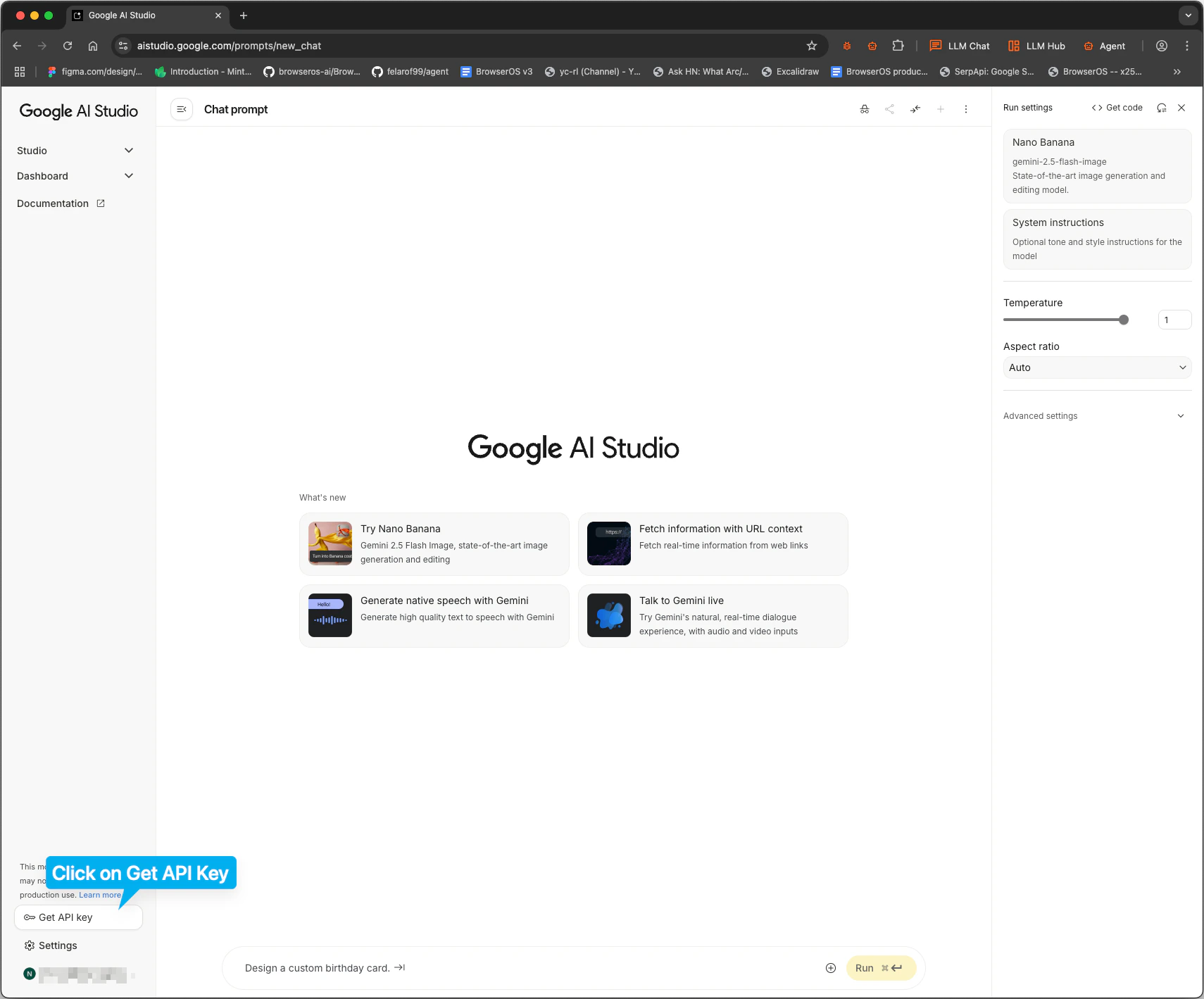
2. Click **Get API key** in the sidebar
3. Click **Create API key** and copy it
**Add to BrowserOS:**
1. Go to `chrome://browseros/settings`
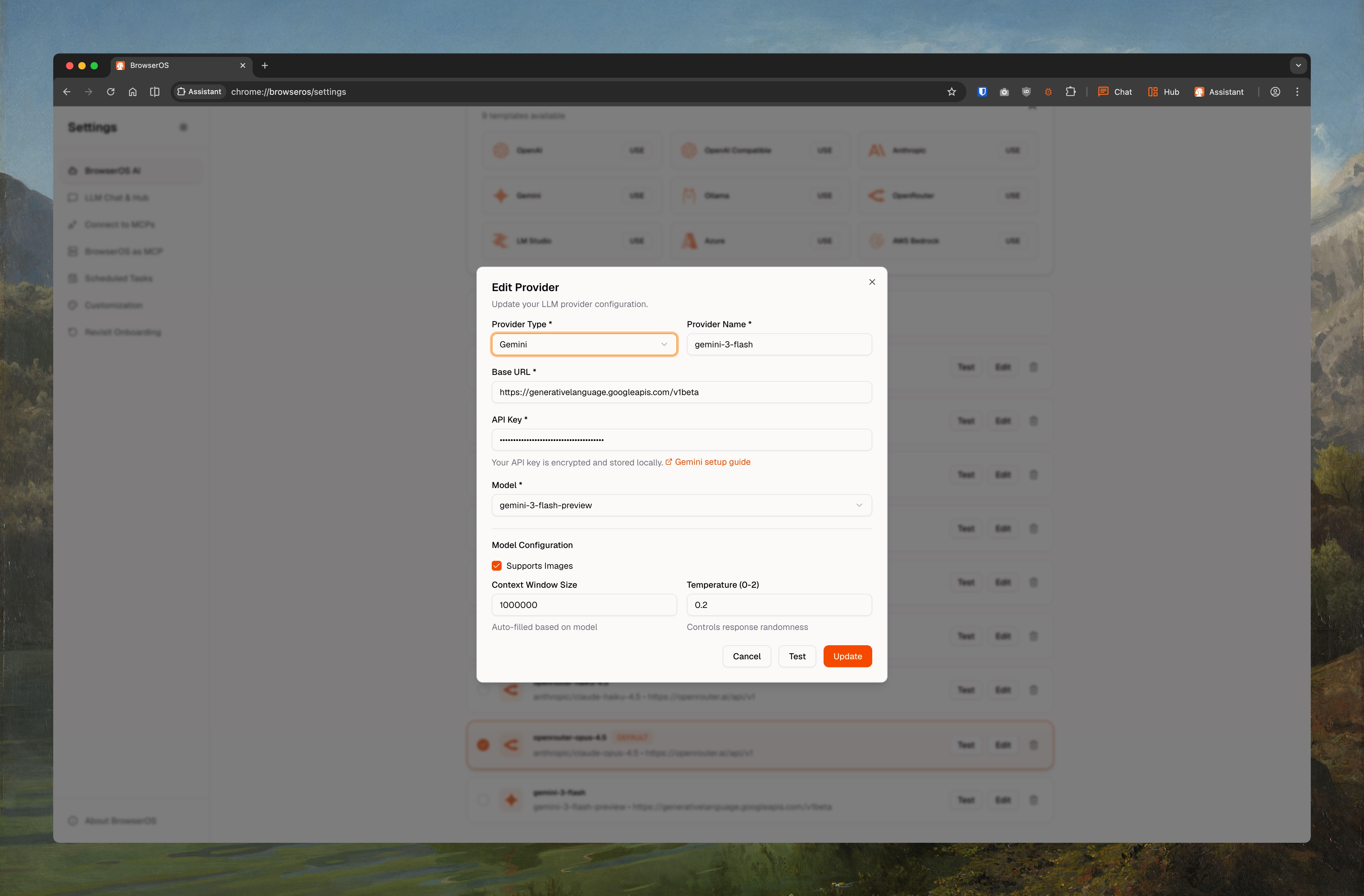
2. Click **USE** on the Gemini card
3. Set **Model ID** to `gemini-2.5-flash` (or `gemini-2.5-pro`, `gemini-3-pro-preview`, `gemini-3-flash-preview`)
4. Paste your API key
5. Check **Supports Images**, set **Context Window** to `1000000`
6. Click **Save**
Claude Opus 4.5 gives the best results for Agent Mode.
**Get your API key:**
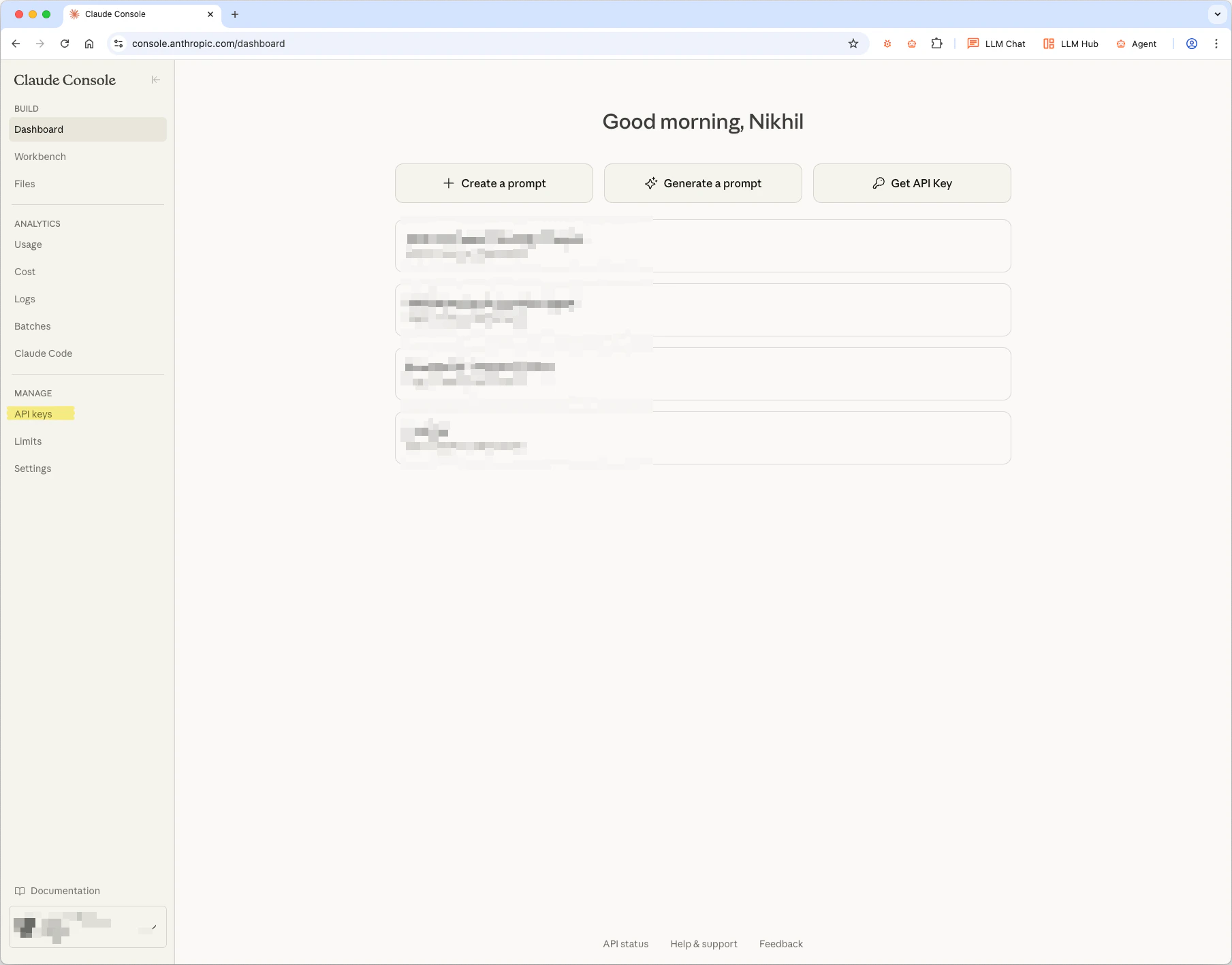
1. Go to [console.anthropic.com](https://console.anthropic.com/dashboard)
2. Click **API keys** in the sidebar
3. Click **Create Key** and copy it
**Add to BrowserOS:**
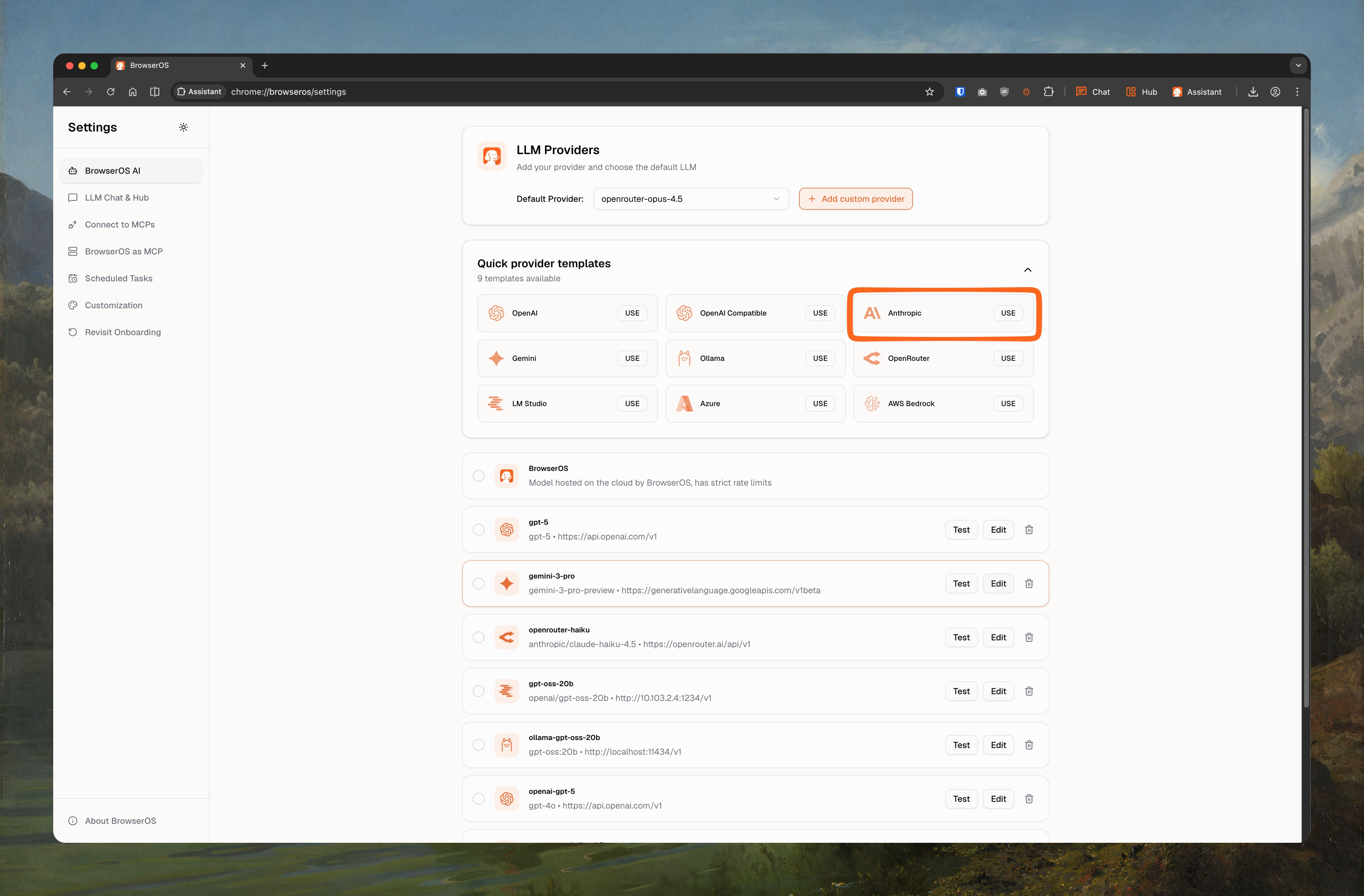
1. Go to `chrome://browseros/settings`
2. Click **USE** on the Anthropic card
3. Set **Model ID** to `claude-opus-4-5-20251101` (or `claude-sonnet-4-5-20250929`, `claude-haiku-4-5-20251001`)
4. Paste your API key
5. Check **Supports Images**, set **Context Window** to `200000`
6. Click **Save**
GPT-5 is OpenAI's most capable model for both chat and agent tasks.
**Get your API key:**
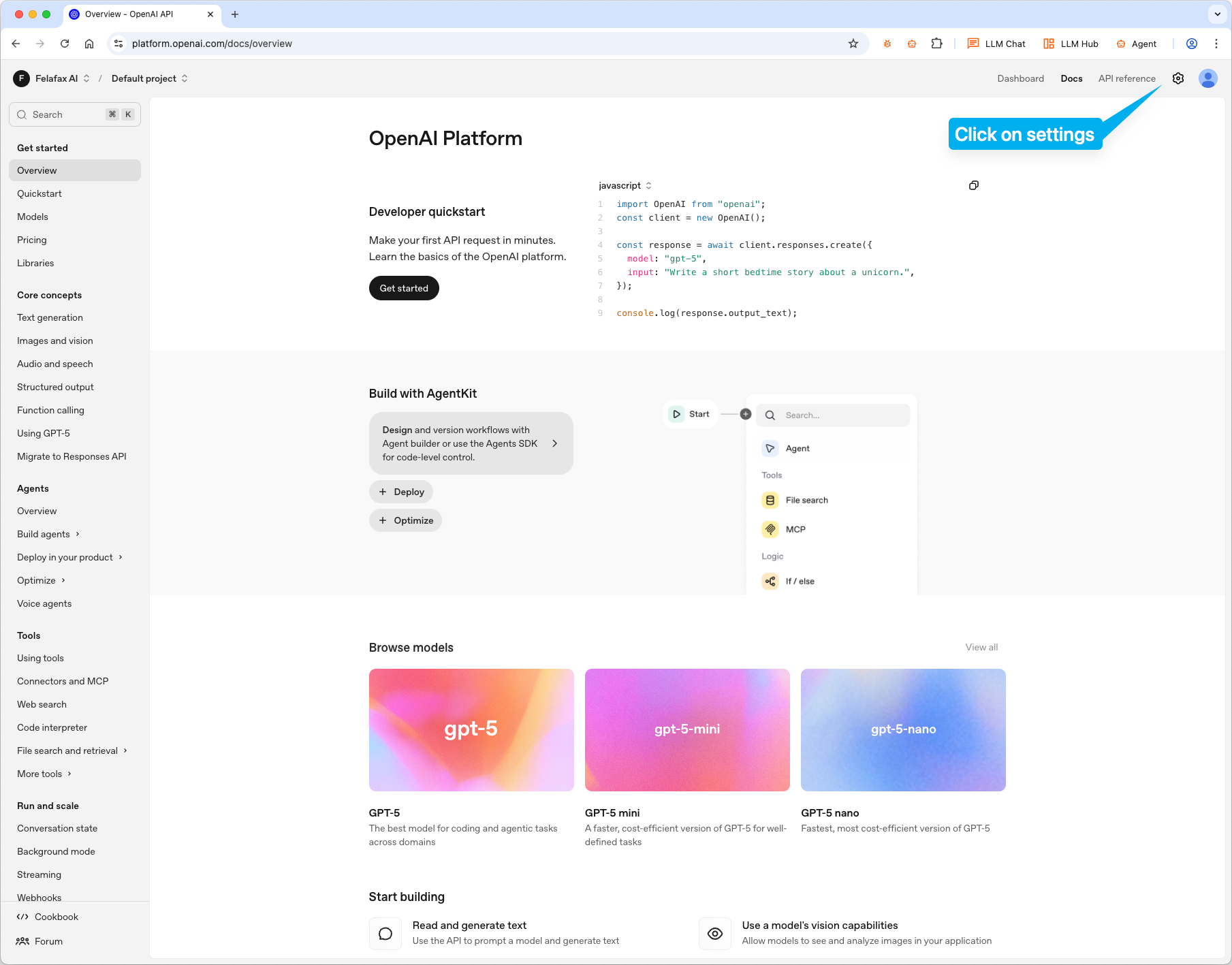
1. Go to [platform.openai.com](https://platform.openai.com)
2. Click settings icon → **API keys**
3. Click **Create new secret key** and copy it
**Add to BrowserOS:**
1. Go to `chrome://browseros/settings`
2. Click **USE** on the OpenAI card
3. Set **Model ID** to `gpt-5` (or `gpt-5.2`, `gpt-5-mini`, `gpt-4.1`, `o4-mini`)
4. Paste your API key
5. Check **Supports Images**, set **Context Window** to `200000`
6. Click **Save**
Access 500+ models through one API.
**Get your API key:**
1. Go to [openrouter.ai](https://openrouter.ai) and sign up
2. Go to [openrouter.ai/keys](https://openrouter.ai/keys) and create a key
**Pick a model:**
Go to [openrouter.ai/models](https://openrouter.ai/models) and copy the model ID you want (e.g., `anthropic/claude-opus-4.5`, `google/gemini-2.5-flash`).
**Add to BrowserOS:**
1. Go to `chrome://browseros/settings`
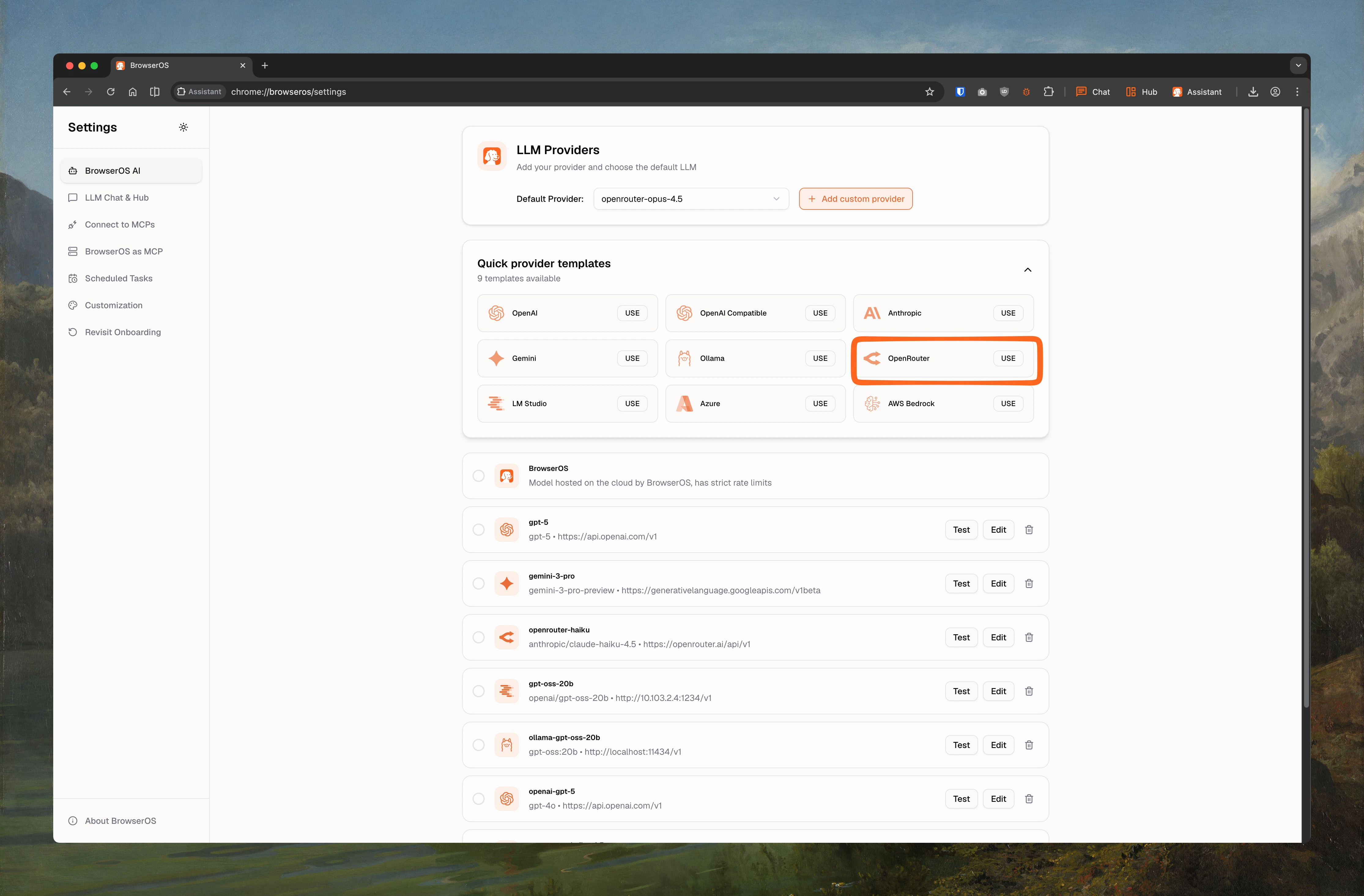
2. Click **USE** on the OpenRouter card
3. Paste the model ID and your API key
4. Set **Context Window** based on the model
5. Click **Save**
Use OpenAI models hosted on your own Azure subscription for enterprise compliance and data residency.
**Prerequisites:**
1. An Azure subscription with access to [Azure OpenAI Service](https://portal.azure.com/#view/Microsoft_Azure_ProjectOxford/CognitiveServicesHub/~/OpenAI)
2. A deployed model (e.g., GPT-4o) in your Azure OpenAI resource
**Get your credentials:**
1. Go to [portal.azure.com](https://portal.azure.com) → **Azure OpenAI** resource
2. Navigate to **Keys and Endpoint**
3. Copy **Key 1** and your **Endpoint URL**
**Add to BrowserOS:**
1. Go to `chrome://browseros/settings`
2. Click **USE** on the Azure card
3. Set **Base URL** to your Azure endpoint (e.g., `https://your-resource.openai.azure.com/openai/deployments/your-deployment`)
4. Set **Model ID** to your deployment name
5. Paste your API key
6. Check **Supports Images**, set **Context Window** to `128000`
7. Click **Save**
Access Claude, Llama, and other models through your AWS account with IAM-based authentication.
**Prerequisites:**
1. An AWS account with [Amazon Bedrock](https://docs.aws.amazon.com/bedrock/latest/userguide/getting-started.html) enabled
2. Model access granted in the Bedrock console for your desired models
**Get your credentials:**
1. Go to the [AWS Console](https://console.aws.amazon.com) → **IAM**
2. Create or use an existing access key with Bedrock permissions
3. Note your **Access Key ID**, **Secret Access Key**, and **Region**
**Add to BrowserOS:**
1. Go to `chrome://browseros/settings`
2. Click **USE** on the AWS Bedrock card
3. Set **Base URL** to your Bedrock endpoint (region-specific)
4. Set **Model ID** to the Bedrock model ID (e.g., `anthropic.claude-3-sonnet-20240229-v1:0`)
5. Paste your credentials
6. Check **Supports Images**, set **Context Window** to `200000`
7. Click **Save**
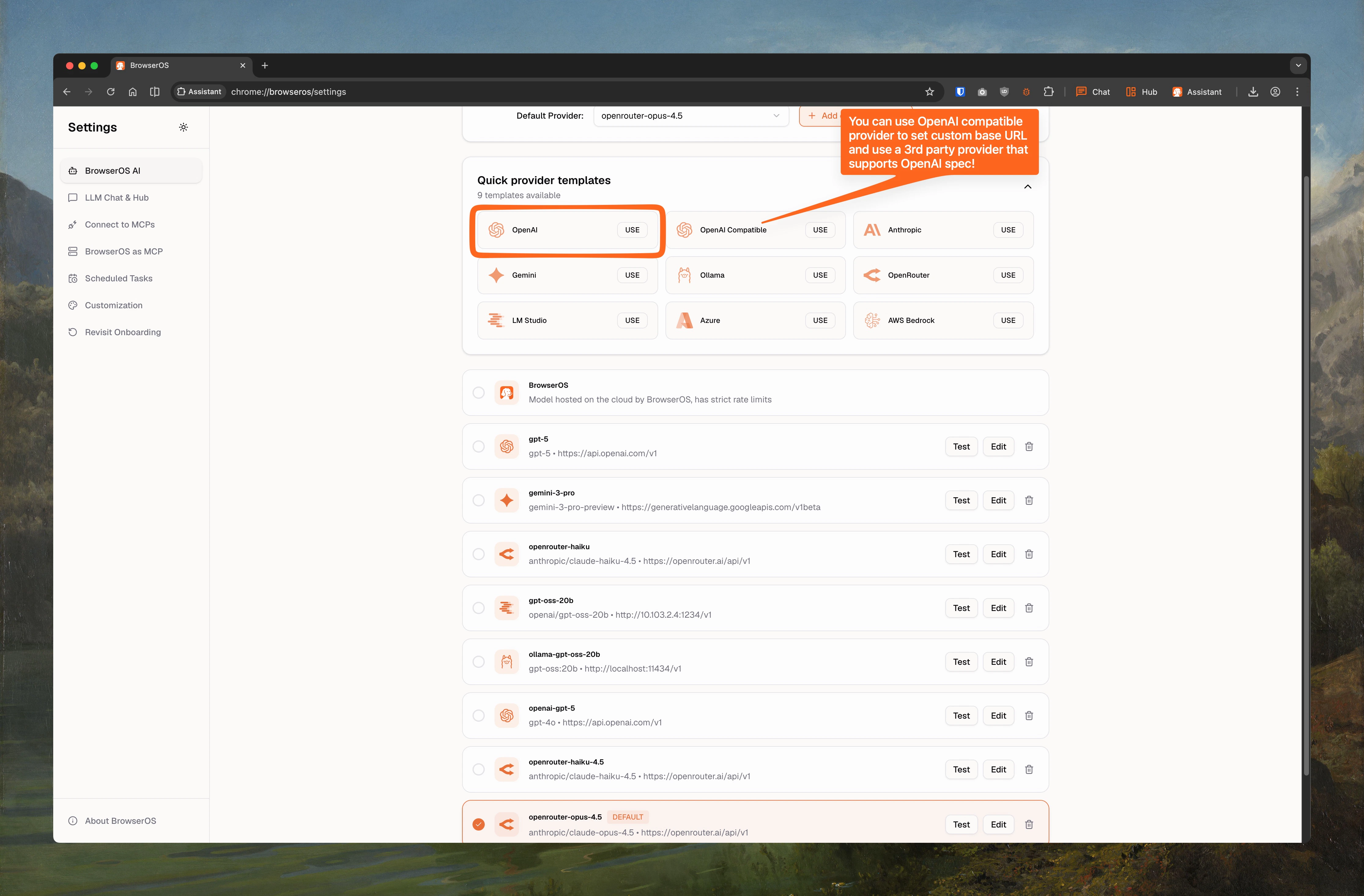
Connect to any provider that implements the OpenAI-compatible API format (e.g., Together AI, Fireworks, Groq, Perplexity).
**Add to BrowserOS:**
1. Go to `chrome://browseros/settings`
2. Click **USE** on the OpenAI Compatible card
3. Set **Base URL** to the provider's API endpoint
4. Set **Model ID** to the model you want to use
5. Paste your API key
6. Set **Supports Images** and **Context Window** based on the model
7. Click **Save**
Most newer AI providers support the OpenAI-compatible API format. Check your provider's docs for the base URL and available model IDs.
***
## Local Models
Run AI completely offline with Ollama or LM Studio. Includes recommended models, context length setup, and configuration steps.
***
## Switching Between Models
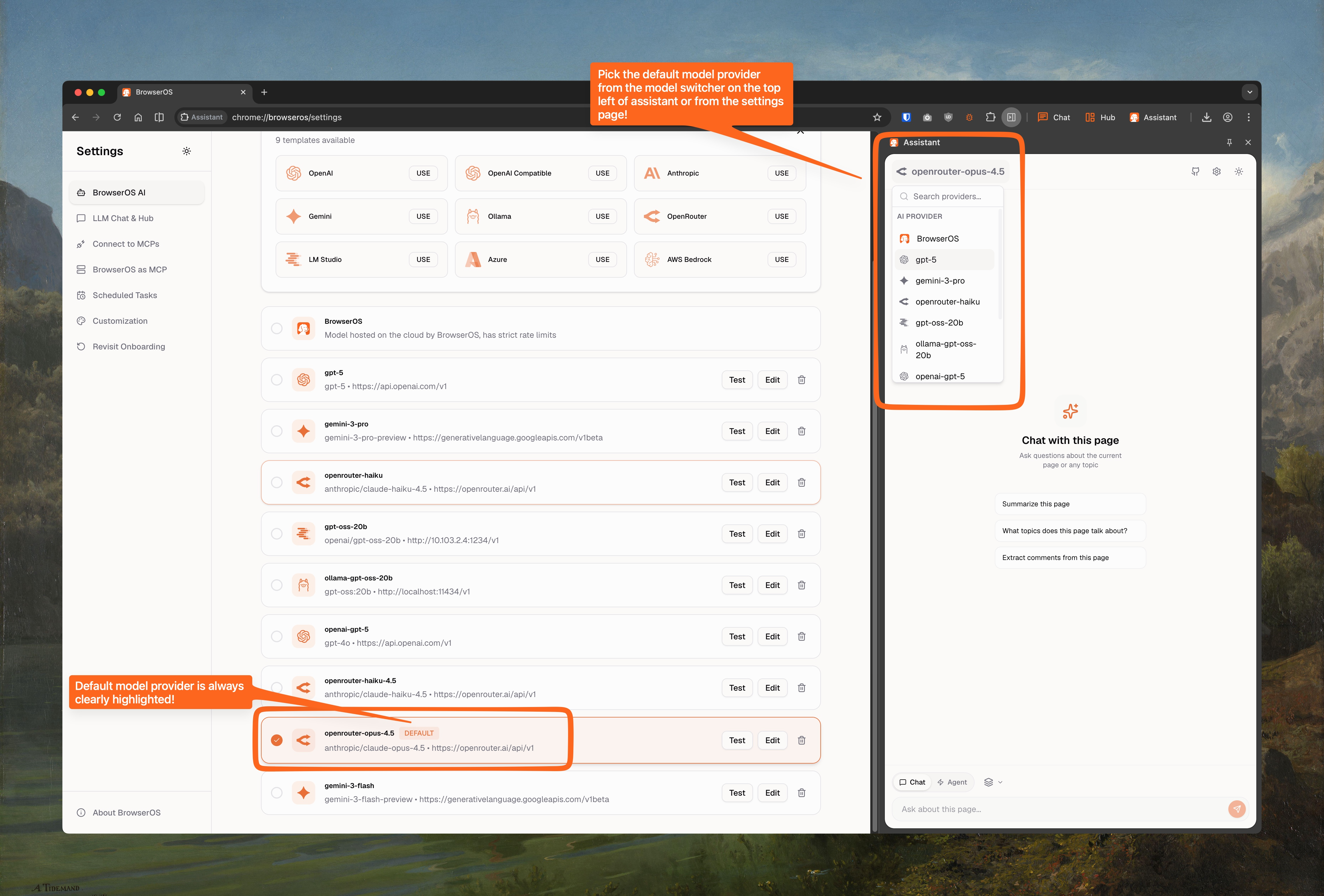
Use the model switcher in the Assistant panel to change providers anytime. The default provider is highlighted.
Use local models for sensitive work data. Switch to Claude for agent tasks that need complex reasoning.
 **Add to BrowserOS:**
1. Go to `chrome://browseros/settings`
2. Click **USE** on the Gemini card
3. Set **Model ID** to `gemini-2.5-flash` (or `gemini-2.5-pro`, `gemini-3-pro-preview`, `gemini-3-flash-preview`)
4. Paste your API key
5. Check **Supports Images**, set **Context Window** to `1000000`
6. Click **Save**
**Add to BrowserOS:**
1. Go to `chrome://browseros/settings`
2. Click **USE** on the Gemini card
3. Set **Model ID** to `gemini-2.5-flash` (or `gemini-2.5-pro`, `gemini-3-pro-preview`, `gemini-3-flash-preview`)
4. Paste your API key
5. Check **Supports Images**, set **Context Window** to `1000000`
6. Click **Save**
 **Add to BrowserOS:**
1. Go to `chrome://browseros/settings`
2. Click **USE** on the Anthropic card
3. Set **Model ID** to `claude-opus-4-5-20251101` (or `claude-sonnet-4-5-20250929`, `claude-haiku-4-5-20251001`)
4. Paste your API key
5. Check **Supports Images**, set **Context Window** to `200000`
6. Click **Save**
**Add to BrowserOS:**
1. Go to `chrome://browseros/settings`
2. Click **USE** on the Anthropic card
3. Set **Model ID** to `claude-opus-4-5-20251101` (or `claude-sonnet-4-5-20250929`, `claude-haiku-4-5-20251001`)
4. Paste your API key
5. Check **Supports Images**, set **Context Window** to `200000`
6. Click **Save**
 **Add to BrowserOS:**
1. Go to `chrome://browseros/settings`
2. Click **USE** on the OpenAI card
3. Set **Model ID** to `gpt-5` (or `gpt-5.2`, `gpt-5-mini`, `gpt-4.1`, `o4-mini`)
4. Paste your API key
5. Check **Supports Images**, set **Context Window** to `200000`
6. Click **Save**
**Add to BrowserOS:**
1. Go to `chrome://browseros/settings`
2. Click **USE** on the OpenAI card
3. Set **Model ID** to `gpt-5` (or `gpt-5.2`, `gpt-5-mini`, `gpt-4.1`, `o4-mini`)
4. Paste your API key
5. Check **Supports Images**, set **Context Window** to `200000`
6. Click **Save**
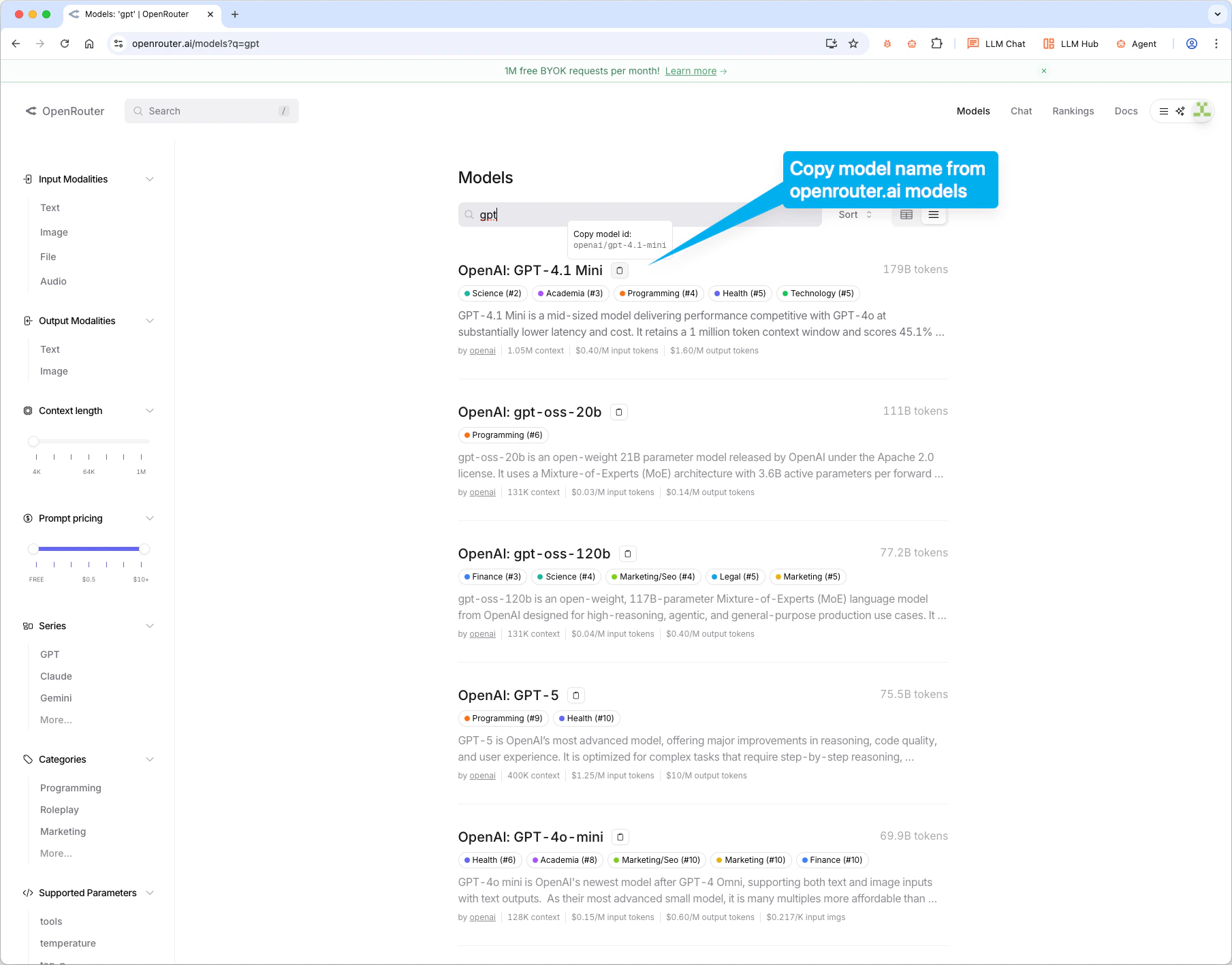 **Add to BrowserOS:**
1. Go to `chrome://browseros/settings`
2. Click **USE** on the OpenRouter card
3. Paste the model ID and your API key
4. Set **Context Window** based on the model
5. Click **Save**
**Add to BrowserOS:**
1. Go to `chrome://browseros/settings`
2. Click **USE** on the OpenRouter card
3. Paste the model ID and your API key
4. Set **Context Window** based on the model
5. Click **Save**