A step-by-step walkthrough from download to your first AI-driven browsing session.
This page walks you from a fresh download to your first AI-driven session. Six steps. About five minutes.
1
Install BrowserOS neo
Head over to browseros.com/agents and download BrowserOS neo for your operating system. Install it the way you’d install any other browser.Once it’s open, it works like Chrome or any other browser you’ve used. Bookmarks, extensions, keyboard shortcuts, all in the same places.
2
Sign in like you normally would
Use BrowserOS neo as your browser for a bit. Sign in to Gmail. Sign in to your calendar. Sign in to Notion, Linear, your CRM, your accounting tool, whatever you use for actual work.There is nothing special about this step. You are just using a browser. But it matters, because every account you sign in to here becomes something your AI can use later.
Your AI cannot see your personal tabs unless you ask it to. It works in its own tabs, side by side with yours. Signing in to Gmail here means your AI can use Gmail when you ask it to. It does not mean your AI is reading your inbox while you’re not looking.
3
Connect BrowserOS neo to your AI
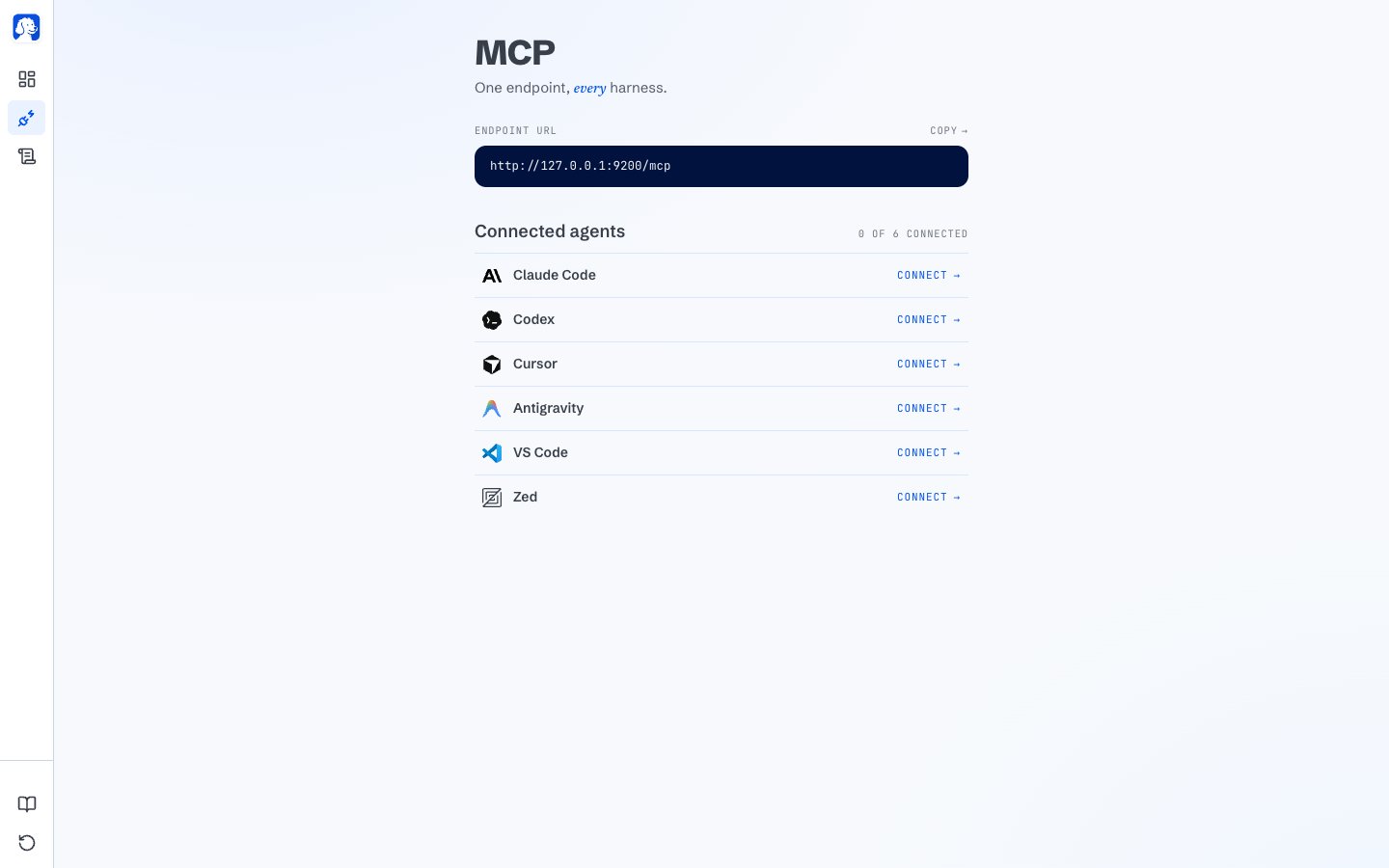
Open a new tab in BrowserOS neo and click MCP in the sidebar. You’ll see a list of AI tools you can connect with one click.
The connect page: one endpoint, one click per AI tool.
Find the AI tool you use: Claude Code, Cursor, Codex, Antigravity, VS Code, Zed, or another. Click Connect on its row. BrowserOS neo sets everything up for you.Restart your AI tool once, and it now has a browser.
Using an AI tool that isn’t listed? Copy the endpoint URL at the top of the page and paste it into your AI’s own settings. See the Connect page for the manual setup.
4
Give your AI a task
Open your AI tool and give it a real task. Something you’d actually want done. To start, try this:
Find a good time next week for a 30-minute team meeting and send the invite.
Or something closer to your own work:
Summarize my important unread emails from the last two days.
Pull the numbers from the Q3 dashboard in Notion and put them in a summary at the top.
Whichever you pick, hit send.
5
Watch it work
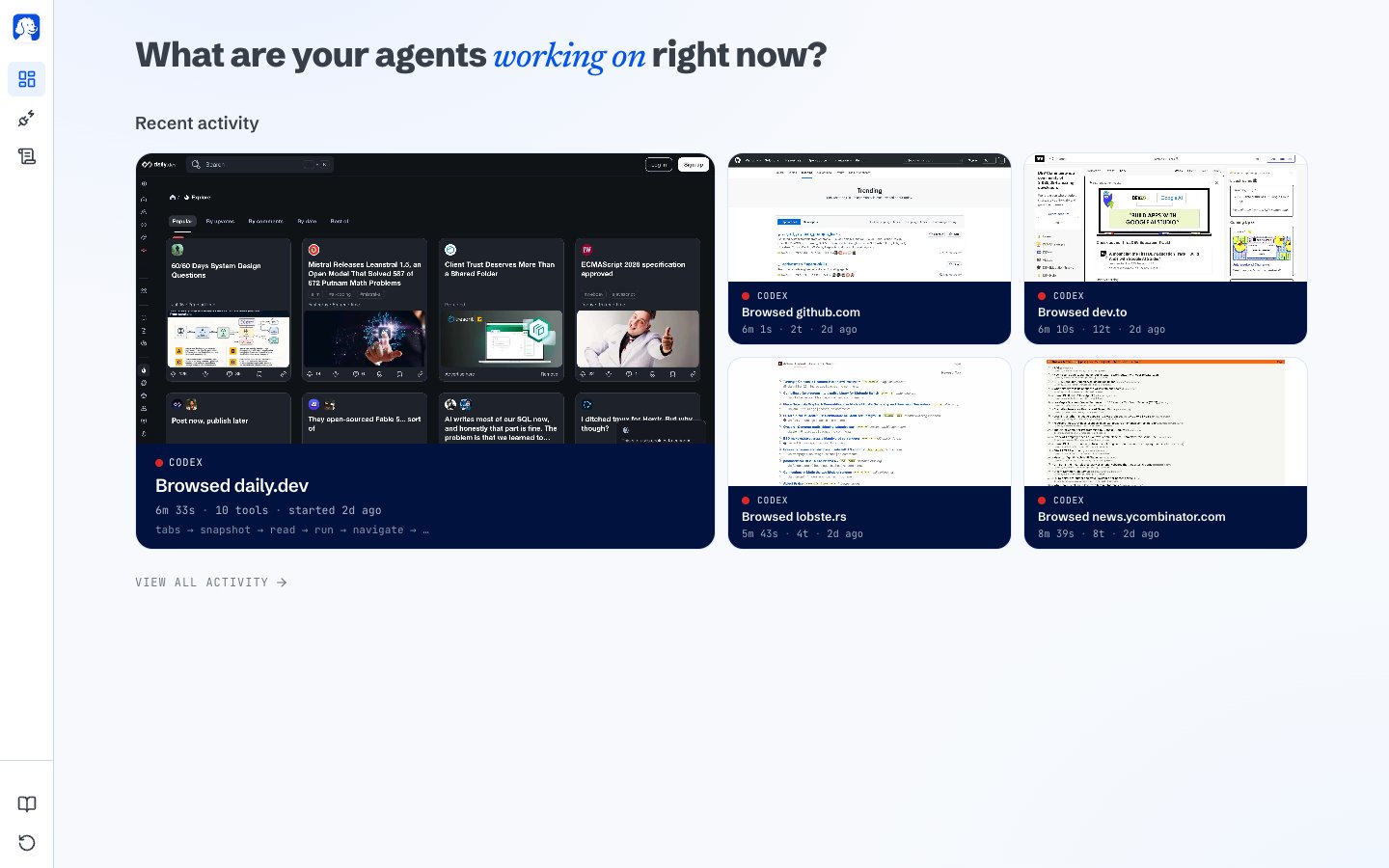
Open a new tab in BrowserOS neo. Your AI’s session shows up on the dashboard.
Every running AI and every finished session, at a glance.
Two things to look at:
Running now: the AI working on your task right now. You’ll see the site it’s on, how long it’s been at it, and a live preview of what it’s looking at.
Recent activity: sessions that already finished. Click any tile to open the full story of what happened.
You don’t have to sit and stare. Come back whenever you want; the dashboard shows you what’s been going on.
6
Replay what your AI did
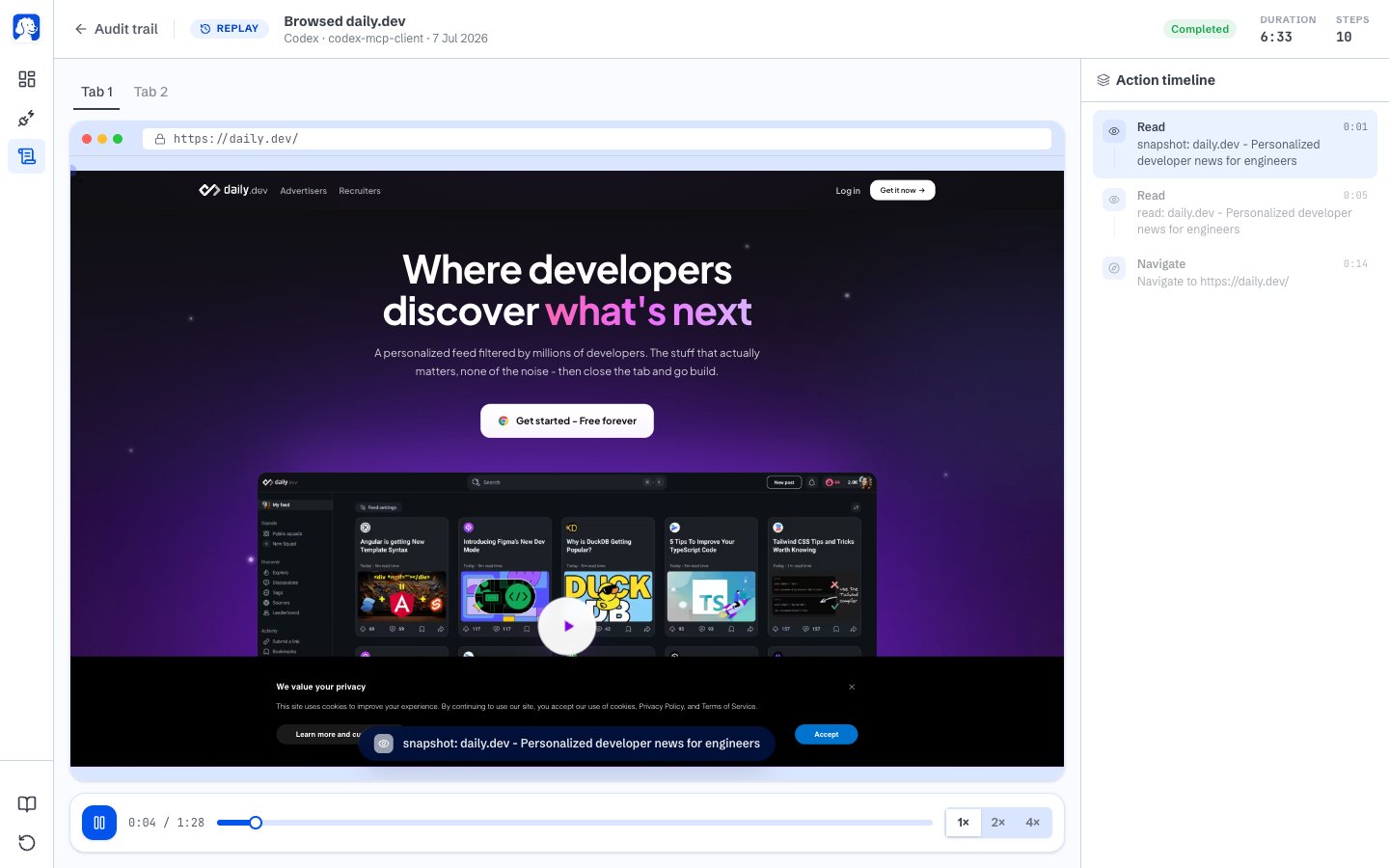
When a session finishes, click its tile. Then click View Session Replay.
Replay any session like a video. Scrub through, see exactly what your AI saw at every moment.
The replay plays back like a video. Hit rewind to see the exact moment things went off, or the exact moment something went well. On the right, every step your AI took is listed in order, and you can click any one to jump the replay to that moment.Now you know what worked. Tell your AI, and it’ll do the next task better.
Every part of the new-tab dashboard and what it tells you.
Your stuff stays yours
What BrowserOS neo records, what it doesn’t, and where everything lives.
⌘I
{"docsConfig":{"theme":"maple","$schema":"https://mintlify.com/docs.json","name":"BrowserOS Documentation","colors":{"primary":"#f25e1a","light":"#FF7A3D","dark":"#D14E10"},"logo":{"light":"https://mintcdn.com/browseros/GK0Rz7EWiwdNKXoA/logo/logo44.png?fit=max\u0026auto=format\u0026n=GK0Rz7EWiwdNKXoA\u0026q=85\u0026s=7bdf8f6b2a48962407d1f499ab67271f","dark":"https://mintcdn.com/browseros/GK0Rz7EWiwdNKXoA/logo/logo44.png?fit=max\u0026auto=format\u0026n=GK0Rz7EWiwdNKXoA\u0026q=85\u0026s=7bdf8f6b2a48962407d1f499ab67271f"},"favicon":"https://mintcdn.com/browseros/GK0Rz7EWiwdNKXoA/logo/favicon.png?fit=max\u0026auto=format\u0026n=GK0Rz7EWiwdNKXoA\u0026q=85\u0026s=db3f13c630b7b37e698000b7d674d2a0","navbar":{"links":[{"href":"/llms.txt","label":"llms.txt"},{"href":"https://discord.gg/YKwjt5vuKr","label":"Support"}],"primary":{"type":"button","label":"Download","href":"https://browseros.com"}},"footer":{"socials":{"x":"https://x.com/browseros_ai","github":"https://github.com/BrowserOS-ai/BrowserOS","discord":"https://discord.gg/YKwjt5vuKr","slack":"https://dub.sh/browserOS-slack"}},"contextual":{"options":["copy","view","chatgpt","claude","perplexity","mcp","cursor","vscode"],"display":"header"},"styling":{"latex":false},"navigation":{"pages":[]}},"deployment":{"deploymentMetadataValue":{"subdomain":"browseros","hasAudioNarration":false,"actualSubdomain":"browseros","customDomains":["docs.browseros.com"],"gitSource":{"type":"github","owner":"browseros-ai","repo":"browseros","deployBranch":"main","contentDirectory":"docs","isPrivate":true,"mountPath":"","label":""},"chroma":{"liveDeploymentHistoryId":"6aabd603e271876f5d282d7e","collectionId":"ea782481-2ee4-4ddb-924c-a2375cabff2a","schemaVersion":"v3","latestBuiltDeploymentHistoryId":"6aabd603e271876f5d282d7e"},"entitlements":{},"buildId":"6aabd603e271876f5d282d7e","clientVersion":"0.0.4074","searchFilterCounts":[{"language":"default","tag":"BrowserOS","count":22},{"language":"default","tag":"Features","count":12},{"language":"default","tag":"BrowserOS neo","count":12},{"language":"default","tag":"Start","count":6},{"language":"default","tag":"More","count":4},{"language":"default","tag":"Comparisons","count":3},{"language":"default","tag":"Reference","count":3},{"language":"default","tag":"Using it","count":3},{"language":"default","tag":"Connect your agent","count":3}]},"assistantConfig":{},"basePath":"","hasChatPermissions":false,"hasWebMcpPermissions":false,"toggles":[{"name":"kill-isr","enabled":true,"variant":{"name":"disabled","enabled":false,"feature_enabled":true},"impressionData":false},{"name":"agent-mintlify-slack","enabled":true,"variant":{"name":"disabled","enabled":false,"feature_enabled":true},"impressionData":false},{"name":"agent-integrations-settings","enabled":true,"variant":{"name":"disabled","enabled":false,"feature_enabled":true},"impressionData":false},{"name":"rbac-expansion","enabled":true,"variant":{"name":"disabled","enabled":false,"feature_enabled":true},"impressionData":false},{"name":"automations-pr-grouping","enabled":true,"variant":{"name":"disabled","enabled":false,"feature_enabled":true},"impressionData":false},{"name":"custom-prefix","enabled":true,"variant":{"name":"disabled","enabled":false,"feature_enabled":true},"impressionData":false},{"name":"analytics-v7","enabled":true,"variant":{"name":"disabled","enabled":false,"feature_enabled":true},"impressionData":false},{"name":"user-flows-analytics","enabled":true,"variant":{"name":"disabled","enabled":false,"feature_enabled":true},"impressionData":false},{"name":"no-publish-flow","enabled":true,"variant":{"name":"disabled","enabled":false,"feature_enabled":true},"impressionData":false},{"name":"workos-onboarding","enabled":true,"variant":{"name":"disabled","enabled":false,"feature_enabled":true},"impressionData":false},{"name":"llms-txt-v2","enabled":true,"variant":{"name":"disabled","enabled":false,"feature_enabled":true},"impressionData":false},{"name":"snapshot-serving-live","enabled":true,"variant":{"name":"disabled","enabled":false,"feature_enabled":true},"impressionData":false},{"name":"stripTemperatureMiddleware","enabled":true,"variant":{"name":"disabled","enabled":false,"feature_enabled":true},"impressionData":false},{"name":"support-platform-pylon-zendesk","enabled":true,"variant":{"name":"disabled","enabled":false,"feature_enabled":true},"impressionData":false},{"name":"snapshot-serving","enabled":true,"variant":{"name":"disabled","enabled":false,"feature_enabled":true},"impressionData":false},{"name":"instant-rollback","enabled":true,"variant":{"name":"disabled","enabled":false,"feature_enabled":true},"impressionData":false},{"name":"granular-notifications-server","enabled":true,"variant":{"name":"disabled","enabled":false,"feature_enabled":true},"impressionData":false},{"name":"granular-notifications","enabled":true,"variant":{"name":"disabled","enabled":false,"feature_enabled":true},"impressionData":false},{"name":"automations-fable","enabled":true,"variant":{"name":"disabled","enabled":false,"feature_enabled":true},"impressionData":false},{"name":"fixed-ai-action-pricing","enabled":true,"variant":{"name":"disabled","enabled":false,"feature_enabled":true},"impressionData":false},{"name":"automation-resolve-merge-conflict","enabled":true,"variant":{"name":"disabled","enabled":false,"feature_enabled":true},"impressionData":false},{"name":"scoped-publishing","enabled":true,"variant":{"name":"disabled","enabled":false,"feature_enabled":true},"impressionData":false},{"name":"mintql","enabled":true,"variant":{"name":"disabled","enabled":false,"feature_enabled":true},"impressionData":false},{"name":"page-level-analytics","enabled":true,"variant":{"name":"disabled","enabled":false,"feature_enabled":true},"impressionData":false},{"name":"editor-version-history-v2","enabled":true,"variant":{"name":"disabled","enabled":false,"feature_enabled":true},"impressionData":false},{"name":"billing-page-v2","enabled":true,"variant":{"name":"disabled","enabled":false,"feature_enabled":true},"impressionData":false},{"name":"full-page-search","enabled":true,"variant":{"name":"disabled","enabled":false,"feature_enabled":true},"impressionData":false},{"name":"workspace-projects","enabled":true,"variant":{"name":"disabled","enabled":false,"feature_enabled":true},"impressionData":false},{"name":"assistant-v5","enabled":true,"variant":{"name":"disabled","enabled":false,"feature_enabled":true},"impressionData":false},{"name":"fork-pr-previews","enabled":true,"variant":{"name":"disabled","enabled":false,"feature_enabled":true},"impressionData":false},{"name":"revalidation-jwt","enabled":true,"variant":{"name":"disabled","enabled":false,"feature_enabled":true},"impressionData":false},{"name":"vite-origin","enabled":true,"variant":{"name":"disabled","enabled":false,"feature_enabled":true},"impressionData":false},{"name":"workos-sso-scim","enabled":true,"variant":{"name":"disabled","enabled":false,"feature_enabled":true},"impressionData":false},{"name":"hobby-abuse-scan","enabled":true,"variant":{"name":"disabled","enabled":false,"feature_enabled":true},"impressionData":false},{"name":"dashboard-inbox","enabled":true,"variant":{"name":"disabled","enabled":false,"feature_enabled":true},"impressionData":false},{"name":"workos-signup","enabled":true,"variant":{"name":"disabled","enabled":false,"feature_enabled":true},"impressionData":false},{"name":"turbopuffer-dual-write","enabled":true,"variant":{"name":"disabled","enabled":false,"feature_enabled":true},"impressionData":false},{"name":"workos-enabled","enabled":true,"variant":{"name":"disabled","enabled":false,"feature_enabled":true},"impressionData":false},{"name":"approve-review-flow","enabled":true,"variant":{"name":"disabled","enabled":false,"feature_enabled":true},"impressionData":false},{"name":"sso-setup-deadline-banner","enabled":true,"variant":{"name":"disabled","enabled":false,"feature_enabled":true},"impressionData":false},{"name":"turbopuffer-serve","enabled":true,"variant":{"name":"disabled","enabled":false,"feature_enabled":true},"impressionData":false},{"name":"live-agents","enabled":true,"variant":{"name":"disabled","enabled":false,"feature_enabled":true},"impressionData":false},{"name":"comment-mode","enabled":true,"variant":{"name":"disabled","enabled":false,"feature_enabled":true},"impressionData":false}],"googleFontsInlined":false},"customCss":[{"filePath":"theme.css","content":":root{--primary: 2 84 236;--primary-light: 61 139 255;--primary-dark: 0 66 202;--color-primary: rgb(2 84 236)}html[data-current-path^=\"/browseros\"]{--primary: 242 94 26;--primary-light: 255 122 61;--primary-dark: 209 78 16;--color-primary: rgb(242 94 26)}html:not([data-current-path^=\"/browseros\"]) #navbar .nav-logo,html:not([data-current-path^=\"/browseros\"]) #sidebar .nav-logo{content:url(\"/logo/neo-wordmark.svg\");width:9.3rem;height:1.75rem;max-width:none}"}],"page":{"pagePath":"neo/how-it-works","slug":"/neo/how-it-works","pageMetadata":{"title":"How BrowserOS neo works","description":"A step-by-step walkthrough from download to your first AI-driven browsing session.","keywords":["BrowserOS neo setup","connect AI to browser","how BrowserOS neo works","AI browser walkthrough"],"href":"/neo/how-it-works"},"description":{"compiledSource":"\"use strict\";\nconst {jsx: _jsx} = arguments[0];\nconst {useMDXComponents: _provideComponents} = arguments[0];\nfunction _createMdxContent(props) {\n const _components = {\n p: \"p\",\n ..._provideComponents(),\n ...props.components\n };\n return _jsx(_components.p, {\n children: \"A step-by-step walkthrough from download to your first AI-driven browsing session.\"\n });\n}\nfunction MDXContent(props = {}) {\n const {wrapper: MDXLayout} = {\n ..._provideComponents(),\n ...props.components\n };\n return MDXLayout ? _jsx(MDXLayout, {\n ...props,\n children: _jsx(_createMdxContent, {\n ...props\n })\n }) : _createMdxContent(props);\n}\nreturn {\n default: MDXContent\n};\n","frontmatter":{},"scope":{}},"pageType":"default","mdx":{"mdxSource":{"compiledSource":"\"use strict\";const{Fragment:_Fragment,jsx:_jsx,jsxs:_jsxs}=arguments[0];const{useMDXComponents:_provideComponents}=arguments[0];function _createMdxContent(props){const _components={a:`a`,code:`code`,li:`li`,p:`p`,pre:`pre`,span:`span`,strong:`strong`,ul:`ul`,..._provideComponents(),...props.components},{Card,CardGroup,CodeBlock,Frame,Heading,Note,OptimizedImage,Step,Steps,Tip}=_components;if(!Card)_missingMdxReference(`Card`,true);if(!CardGroup)_missingMdxReference(`CardGroup`,true);if(!CodeBlock)_missingMdxReference(`CodeBlock`,true);if(!Frame)_missingMdxReference(`Frame`,true);if(!Heading)_missingMdxReference(`Heading`,true);if(!Note)_missingMdxReference(`Note`,true);if(!OptimizedImage)_missingMdxReference(`OptimizedImage`,true);if(!Step)_missingMdxReference(`Step`,true);if(!Steps)_missingMdxReference(`Steps`,true);if(!Tip)_missingMdxReference(`Tip`,true);return _jsxs(_Fragment,{children:[_jsx(_components.p,{children:`This page walks you from a fresh download to your first AI-driven session. Six steps. About five minutes.`}),`\n`,_jsxs(Steps,{children:[_jsxs(Step,{title:`Install BrowserOS neo`,children:[_jsxs(_components.p,{children:[`Head over to `,_jsx(_components.a,{href:`https://browseros.com/agents`,children:`browseros.com/agents`}),` and download BrowserOS neo for your operating system. Install it the way you’d install any other browser.`]}),_jsx(_components.p,{children:`Once it’s open, it works like Chrome or any other browser you’ve used. Bookmarks, extensions, keyboard shortcuts, all in the same places.`})]}),_jsxs(Step,{title:`Sign in like you normally would`,children:[_jsx(_components.p,{children:`Use BrowserOS neo as your browser for a bit. Sign in to Gmail. Sign in to your calendar. Sign in to Notion, Linear, your CRM, your accounting tool, whatever you use for actual work.`}),_jsx(_components.p,{children:`There is nothing special about this step. You are just using a browser. But it matters, because every account you sign in to here becomes something your AI can use later.`}),_jsx(Note,{children:_jsx(_components.p,{children:`Your AI cannot see your personal tabs unless you ask it to. It works in its own tabs, side by side with yours. Signing in to Gmail here means your AI can use Gmail when you ask it to. It does not mean your AI is reading your inbox while you’re not looking.`})})]}),_jsxs(Step,{title:`Connect BrowserOS neo to your AI`,children:[_jsxs(_components.p,{children:[`Open a new tab in BrowserOS neo and click `,_jsx(_components.strong,{children:`MCP`}),` in the sidebar. You’ll see a list of AI tools you can connect with one click.`]}),_jsx(Frame,{caption:`The connect page: one endpoint, one click per AI tool.`,children:_jsx(OptimizedImage,{src:`https://mintcdn.com/browseros/XNhUGfJXYjA7WTpI/images/browserclaw--mcp-install-board.png?fit=max\u0026auto=format\u0026n=XNhUGfJXYjA7WTpI\u0026q=85\u0026s=7ee72dd15872d75ddd3f5e0868bafcf3`,alt:`BrowserOS neo connect page showing an endpoint URL at the top and six AI tools listed underneath: Claude Code, Codex, Cursor, Antigravity, VS Code, and Zed. Each has a Connect button on the right.`,\"data-og-width\":`1440`,width:`1440`,\"data-og-height\":`900`,height:`900`,\"data-path\":`images/browserclaw--mcp-install-board.png`,\"data-optimize\":`true`,\"data-opv\":`3`,srcset:`https://mintcdn.com/browseros/XNhUGfJXYjA7WTpI/images/browserclaw--mcp-install-board.png?w=280\u0026fit=max\u0026auto=format\u0026n=XNhUGfJXYjA7WTpI\u0026q=85\u0026s=37c56d3b7672b8d8bf0cb1cad3857c25 280w, https://mintcdn.com/browseros/XNhUGfJXYjA7WTpI/images/browserclaw--mcp-install-board.png?w=560\u0026fit=max\u0026auto=format\u0026n=XNhUGfJXYjA7WTpI\u0026q=85\u0026s=2a797bce46c423b08f202766bfbfd889 560w, https://mintcdn.com/browseros/XNhUGfJXYjA7WTpI/images/browserclaw--mcp-install-board.png?w=840\u0026fit=max\u0026auto=format\u0026n=XNhUGfJXYjA7WTpI\u0026q=85\u0026s=f012d159b4f407b0f308d8623f705f20 840w, https://mintcdn.com/browseros/XNhUGfJXYjA7WTpI/images/browserclaw--mcp-install-board.png?w=1100\u0026fit=max\u0026auto=format\u0026n=XNhUGfJXYjA7WTpI\u0026q=85\u0026s=333eae1b23d9e363f593c3bda071dfeb 1100w, https://mintcdn.com/browseros/XNhUGfJXYjA7WTpI/images/browserclaw--mcp-install-board.png?w=1650\u0026fit=max\u0026auto=format\u0026n=XNhUGfJXYjA7WTpI\u0026q=85\u0026s=a0b8f490308b6b480880783bd972316f 1650w, https://mintcdn.com/browseros/XNhUGfJXYjA7WTpI/images/browserclaw--mcp-install-board.png?w=2500\u0026fit=max\u0026auto=format\u0026n=XNhUGfJXYjA7WTpI\u0026q=85\u0026s=dca6b7d50f91e10752f9069c6cb4d80f 2500w`})}),_jsxs(_components.p,{children:[`Find the AI tool you use: Claude Code, Cursor, Codex, Antigravity, VS Code, Zed, or another. Click `,_jsx(_components.strong,{children:`Connect`}),` on its row. BrowserOS neo sets everything up for you.`]}),_jsx(_components.p,{children:`Restart your AI tool once, and it now has a browser.`}),_jsx(Tip,{children:_jsxs(_components.p,{children:[`Using an AI tool that isn’t listed? Copy the endpoint URL at the top of the page and paste it into your AI’s own settings. See the `,_jsx(_components.a,{href:`/neo/mcp`,children:`Connect page`}),` for the manual setup.`]})})]}),_jsxs(Step,{title:`Give your AI a task`,children:[_jsx(_components.p,{children:`Open your AI tool and give it a real task. Something you’d actually want done. To start, try this:`}),_jsx(CodeBlock,{filename:``,numberOfLines:`2`,language:`text`,children:_jsx(_components.pre,{className:`shiki shiki-themes github-light-default dark-plus`,style:{backgroundColor:`#ffffff`,\"--shiki-dark-bg\":`#0B0C0E`,color:`#1f2328`,\"--shiki-dark\":`#D4D4D4`},language:`text`,children:_jsxs(_components.code,{language:`text`,numberOfLines:`2`,children:[_jsx(_components.span,{className:`line`,children:_jsx(_components.span,{children:`Find a good time next week for a 30-minute team meeting and send the invite.`})}),`\n`,_jsx(_components.span,{className:`line`,children:_jsx(_components.span,{})})]})})}),_jsx(_components.p,{children:`Or something closer to your own work:`}),_jsx(CodeBlock,{filename:``,numberOfLines:`2`,language:`text`,children:_jsx(_components.pre,{className:`shiki shiki-themes github-light-default dark-plus`,style:{backgroundColor:`#ffffff`,\"--shiki-dark-bg\":`#0B0C0E`,color:`#1f2328`,\"--shiki-dark\":`#D4D4D4`},language:`text`,children:_jsxs(_components.code,{language:`text`,numberOfLines:`2`,children:[_jsx(_components.span,{className:`line`,children:_jsx(_components.span,{children:`Summarize my important unread emails from the last two days.`})}),`\n`,_jsx(_components.span,{className:`line`,children:_jsx(_components.span,{})})]})})}),_jsx(CodeBlock,{filename:``,numberOfLines:`2`,language:`text`,children:_jsx(_components.pre,{className:`shiki shiki-themes github-light-default dark-plus`,style:{backgroundColor:`#ffffff`,\"--shiki-dark-bg\":`#0B0C0E`,color:`#1f2328`,\"--shiki-dark\":`#D4D4D4`},language:`text`,children:_jsxs(_components.code,{language:`text`,numberOfLines:`2`,children:[_jsx(_components.span,{className:`line`,children:_jsx(_components.span,{children:`Pull the numbers from the Q3 dashboard in Notion and put them in a summary at the top.`})}),`\n`,_jsx(_components.span,{className:`line`,children:_jsx(_components.span,{})})]})})}),_jsx(_components.p,{children:`Whichever you pick, hit send.`})]}),_jsxs(Step,{title:`Watch it work`,children:[_jsx(_components.p,{children:`Open a new tab in BrowserOS neo. Your AI’s session shows up on the dashboard.`}),_jsx(Frame,{caption:`Every running AI and every finished session, at a glance.`,children:_jsx(OptimizedImage,{src:`https://mintcdn.com/browseros/XNhUGfJXYjA7WTpI/images/browserclaw--dashboard-populated.png?fit=max\u0026auto=format\u0026n=XNhUGfJXYjA7WTpI\u0026q=85\u0026s=b20fa8b1da957d1edad71872dd0f75da`,alt:`BrowserOS neo new-tab dashboard with a large italic headline reading 'What are your agents working on right now?' A row of Running now cards shows a live agent session with a live browser preview. Below it, a grid of Recent activity tiles shows five completed sessions with the sites they visited.`,\"data-og-width\":`1440`,width:`1440`,\"data-og-height\":`900`,height:`900`,\"data-path\":`images/browserclaw--dashboard-populated.png`,\"data-optimize\":`true`,\"data-opv\":`3`,srcset:`https://mintcdn.com/browseros/XNhUGfJXYjA7WTpI/images/browserclaw--dashboard-populated.png?w=280\u0026fit=max\u0026auto=format\u0026n=XNhUGfJXYjA7WTpI\u0026q=85\u0026s=651b48887991a735b3ab35341830266f 280w, https://mintcdn.com/browseros/XNhUGfJXYjA7WTpI/images/browserclaw--dashboard-populated.png?w=560\u0026fit=max\u0026auto=format\u0026n=XNhUGfJXYjA7WTpI\u0026q=85\u0026s=3d067f43bde3b6fe6b911e484c6ee388 560w, https://mintcdn.com/browseros/XNhUGfJXYjA7WTpI/images/browserclaw--dashboard-populated.png?w=840\u0026fit=max\u0026auto=format\u0026n=XNhUGfJXYjA7WTpI\u0026q=85\u0026s=e86553ebbbbf4cee29267a630e5da4e5 840w, https://mintcdn.com/browseros/XNhUGfJXYjA7WTpI/images/browserclaw--dashboard-populated.png?w=1100\u0026fit=max\u0026auto=format\u0026n=XNhUGfJXYjA7WTpI\u0026q=85\u0026s=c77940558ad26fdeb36ce7b0aeb154bb 1100w, https://mintcdn.com/browseros/XNhUGfJXYjA7WTpI/images/browserclaw--dashboard-populated.png?w=1650\u0026fit=max\u0026auto=format\u0026n=XNhUGfJXYjA7WTpI\u0026q=85\u0026s=3cf6a2b064daee56480c048615494f3c 1650w, https://mintcdn.com/browseros/XNhUGfJXYjA7WTpI/images/browserclaw--dashboard-populated.png?w=2500\u0026fit=max\u0026auto=format\u0026n=XNhUGfJXYjA7WTpI\u0026q=85\u0026s=6484d1a7fbbebea772deb6bd8fbfa645 2500w`})}),_jsx(_components.p,{children:`Two things to look at:`}),_jsxs(_components.ul,{children:[`\n`,_jsxs(_components.li,{children:[_jsx(_components.strong,{children:`Running now`}),`: the AI working on your task right now. You’ll see the site it’s on, how long it’s been at it, and a live preview of what it’s looking at.`]}),`\n`,_jsxs(_components.li,{children:[_jsx(_components.strong,{children:`Recent activity`}),`: sessions that already finished. Click any tile to open the full story of what happened.`]}),`\n`]}),_jsx(_components.p,{children:`You don’t have to sit and stare. Come back whenever you want; the dashboard shows you what’s been going on.`})]}),_jsxs(Step,{title:`Replay what your AI did`,children:[_jsxs(_components.p,{children:[`When a session finishes, click its tile. Then click `,_jsx(_components.strong,{children:`View Session Replay`}),`.`]}),_jsx(Frame,{caption:`Replay any session like a video. Scrub through, see exactly what your AI saw at every moment.`,children:_jsx(OptimizedImage,{src:`https://mintcdn.com/browseros/XNhUGfJXYjA7WTpI/images/browserclaw--replay-scrubber.png?fit=max\u0026auto=format\u0026n=XNhUGfJXYjA7WTpI\u0026q=85\u0026s=ede236cf721de9ccce17bd9d6da63f28`,alt:`BrowserOS neo replay screen showing a full-fidelity playback of a page the AI browsed. A play/pause scrubber sits at the bottom. On the right, an action timeline lists every step the AI took, synced to the current moment in the video.`,\"data-og-width\":`1440`,width:`1440`,\"data-og-height\":`900`,height:`900`,\"data-path\":`images/browserclaw--replay-scrubber.png`,\"data-optimize\":`true`,\"data-opv\":`3`,srcset:`https://mintcdn.com/browseros/XNhUGfJXYjA7WTpI/images/browserclaw--replay-scrubber.png?w=280\u0026fit=max\u0026auto=format\u0026n=XNhUGfJXYjA7WTpI\u0026q=85\u0026s=858b08fb353db40a7ec4c34c986ec7a5 280w, https://mintcdn.com/browseros/XNhUGfJXYjA7WTpI/images/browserclaw--replay-scrubber.png?w=560\u0026fit=max\u0026auto=format\u0026n=XNhUGfJXYjA7WTpI\u0026q=85\u0026s=ed65651670aaa76388d33ca1e6483bd5 560w, https://mintcdn.com/browseros/XNhUGfJXYjA7WTpI/images/browserclaw--replay-scrubber.png?w=840\u0026fit=max\u0026auto=format\u0026n=XNhUGfJXYjA7WTpI\u0026q=85\u0026s=e37f0cccb12bb8a9e4d91548a91f04b7 840w, https://mintcdn.com/browseros/XNhUGfJXYjA7WTpI/images/browserclaw--replay-scrubber.png?w=1100\u0026fit=max\u0026auto=format\u0026n=XNhUGfJXYjA7WTpI\u0026q=85\u0026s=b2a6822a29c03539952a52d3be6c47d2 1100w, https://mintcdn.com/browseros/XNhUGfJXYjA7WTpI/images/browserclaw--replay-scrubber.png?w=1650\u0026fit=max\u0026auto=format\u0026n=XNhUGfJXYjA7WTpI\u0026q=85\u0026s=2a89badc4e9be9a24b0e72617bacd9c1 1650w, https://mintcdn.com/browseros/XNhUGfJXYjA7WTpI/images/browserclaw--replay-scrubber.png?w=2500\u0026fit=max\u0026auto=format\u0026n=XNhUGfJXYjA7WTpI\u0026q=85\u0026s=2426a421f30c6e2eb8c1a0b41e3a8cbe 2500w`})}),_jsx(_components.p,{children:`The replay plays back like a video. Hit rewind to see the exact moment things went off, or the exact moment something went well. On the right, every step your AI took is listed in order, and you can click any one to jump the replay to that moment.`}),_jsx(_components.p,{children:`Now you know what worked. Tell your AI, and it’ll do the next task better.`})]})]}),`\n`,_jsx(Heading,{level:`2`,id:`where-to-next`,children:`Where to next`}),`\n`,_jsxs(CardGroup,{cols:2,children:[_jsx(Card,{title:`Your dashboard`,icon:`binoculars`,href:`/neo/cockpit`,children:_jsx(_components.p,{children:`Every part of the new-tab dashboard and what it tells you.`})}),_jsx(Card,{title:`Your stuff stays yours`,icon:`lock`,href:`/neo/privacy`,children:_jsx(_components.p,{children:`What BrowserOS neo records, what it doesn’t, and where everything lives.`})})]})]})}function MDXContent(props={}){const{wrapper:MDXLayout}={..._provideComponents(),...props.components};return MDXLayout?_jsx(MDXLayout,{...props,children:_jsx(_createMdxContent,{...props})}):_createMdxContent(props)}return{default:MDXContent};function _missingMdxReference(id,component){throw new Error(`Expected `+(component?`component`:`object`)+\" `\"+id+\"` to be defined: you likely forgot to import, pass, or provide it.\")}","frontmatter":{},"scope":{"config":{},"pageMetadata":{"title":"How BrowserOS neo works","description":"A step-by-step walkthrough from download to your first AI-driven browsing session.","keywords":["BrowserOS neo setup","connect AI to browser","how BrowserOS neo works","AI browser walkthrough"],"href":"/neo/how-it-works"}}},"mdxSourceWithNoJs":null},"mdxExtracts":{"tableOfContents":[{"title":"Where to next","slug":"where-to-next","depth":2,"children":[]}],"codeExamples":{}},"jsLinks":["/_mintlify/custom/browseros/a3f087f360fbc32f/product-logo-link.js"],"subdomain":"browseros","siteName":"BrowserOS Documentation","title":"How BrowserOS neo works - BrowserOS Documentation","navMaps":{"firstHrefInVersion":{},"firstHrefInLanguage":{}},"lastModified":"2026-08-05T00:35:31.627Z","originalFileLocation":"neo/how-it-works.mdx"},"headHtml":"\u003cscript data-mint-head>(function(){var d=document.documentElement,p=null;if(!p){try{p=localStorage.getItem(\"isDarkMode\")}catch(e){}if(p==='true')p='dark';else if(p==='false')p='light';if(p!=='light'\u0026\u0026p!=='dark'\u0026\u0026p!=='system')p=\"system\"}var r=p==='system'?(matchMedia(\"(prefers-color-scheme: dark)\").matches?'dark':'light'):p;d.classList.remove(r==='dark'?'light':'dark');d.classList.add(r);d.setAttribute(\"data-theme-preference\",p)})();\u003c/script>\u003cmeta data-mint-head name=\"description\" content=\"A step-by-step walkthrough from download to your first AI-driven browsing session.\">\u003cmeta data-mint-head name=\"application-name\" content=\"BrowserOS Documentation\">\u003cmeta data-mint-head name=\"generator\" content=\"Mintlify\">\u003clink data-mint-head rel=\"icon\" type=\"image/png\" sizes=\"192x192\" href=\"/mintlify-assets/_mintlify/favicons/browseros/1ZvmPEvcjxN85jzu/_generated/favicon/android-chrome-192x192.png\" media=\"(prefers-color-scheme: light)\">\u003clink data-mint-head rel=\"apple-touch-icon\" type=\"image/png\" sizes=\"180x180\" href=\"/mintlify-assets/_mintlify/favicons/browseros/1ZvmPEvcjxN85jzu/_generated/favicon/apple-touch-icon.png\">\u003clink data-mint-head rel=\"icon\" type=\"image/png\" sizes=\"16x16\" href=\"/mintlify-assets/_mintlify/favicons/browseros/1ZvmPEvcjxN85jzu/_generated/favicon/favicon-16x16.png\" media=\"(prefers-color-scheme: light)\">\u003clink data-mint-head rel=\"icon\" type=\"image/png\" sizes=\"32x32\" href=\"/mintlify-assets/_mintlify/favicons/browseros/1ZvmPEvcjxN85jzu/_generated/favicon/favicon-32x32.png\" media=\"(prefers-color-scheme: light)\">\u003clink data-mint-head rel=\"shortcut icon\" type=\"image/x-icon\" href=\"/mintlify-assets/_mintlify/favicons/browseros/1ZvmPEvcjxN85jzu/_generated/favicon/favicon.ico\" media=\"(prefers-color-scheme: light)\">\u003clink data-mint-head rel=\"icon\" type=\"image/png\" sizes=\"192x192\" href=\"/mintlify-assets/_mintlify/favicons/browseros/1ZvmPEvcjxN85jzu/_generated/favicon-dark/android-chrome-192x192.png\" media=\"(prefers-color-scheme: dark)\">\u003clink data-mint-head rel=\"icon\" type=\"image/png\" sizes=\"16x16\" href=\"/mintlify-assets/_mintlify/favicons/browseros/1ZvmPEvcjxN85jzu/_generated/favicon-dark/favicon-16x16.png\" media=\"(prefers-color-scheme: dark)\">\u003clink data-mint-head rel=\"icon\" type=\"image/png\" sizes=\"32x32\" href=\"/mintlify-assets/_mintlify/favicons/browseros/1ZvmPEvcjxN85jzu/_generated/favicon-dark/favicon-32x32.png\" media=\"(prefers-color-scheme: dark)\">\u003clink data-mint-head rel=\"shortcut icon\" type=\"image/x-icon\" href=\"/mintlify-assets/_mintlify/favicons/browseros/1ZvmPEvcjxN85jzu/_generated/favicon-dark/favicon.ico\" media=\"(prefers-color-scheme: dark)\">\u003cmeta data-mint-head property=\"og:title\" content=\"How BrowserOS neo works - BrowserOS Documentation\">\u003cmeta data-mint-head property=\"og:description\" content=\"A step-by-step walkthrough from download to your first AI-driven browsing session.\">\u003cmeta data-mint-head property=\"og:site_name\" content=\"BrowserOS Documentation\">\u003cmeta data-mint-head property=\"og:url\" content=\"https://docs.browseros.com/neo/how-it-works\">\u003cmeta data-mint-head property=\"og:type\" content=\"website\">\u003cmeta data-mint-head property=\"og:image\" content=\"https://browseros.mintlify.site/_mintlify/api/og/v2?division=Start\u0026amp;title=How+BrowserOS+neo+works\u0026amp;description=A+step-by-step+walkthrough+from+download+to+your+first+AI-driven+browsing+session.\u0026amp;theme=c5dda85188685a81a764f64c\u0026amp;signature=4d5503afa7301aeb9971c6a7a5c795c03fed503807ea189e916034b6313beb40\">\u003cmeta data-mint-head property=\"og:image:width\" content=\"1200\">\u003cmeta data-mint-head property=\"og:image:height\" content=\"630\">\u003cmeta data-mint-head name=\"twitter:card\" content=\"summary_large_image\">\u003cmeta data-mint-head name=\"twitter:title\" content=\"How BrowserOS neo works - BrowserOS Documentation\">\u003cmeta data-mint-head name=\"twitter:description\" content=\"A step-by-step walkthrough from download to your first AI-driven browsing session.\">\u003cmeta data-mint-head name=\"twitter:image\" content=\"https://browseros.mintlify.site/_mintlify/api/og/v2?division=Start\u0026amp;title=How+BrowserOS+neo+works\u0026amp;description=A+step-by-step+walkthrough+from+download+to+your+first+AI-driven+browsing+session.\u0026amp;theme=c5dda85188685a81a764f64c\u0026amp;signature=4d5503afa7301aeb9971c6a7a5c795c03fed503807ea189e916034b6313beb40\">\u003cmeta data-mint-head name=\"twitter:image:width\" content=\"1200\">\u003cmeta data-mint-head name=\"twitter:image:height\" content=\"630\">\u003cmeta data-mint-head name=\"msapplication-config\" content=\"/mintlify-assets/_mintlify/favicons/browseros/1ZvmPEvcjxN85jzu/_generated/favicon/browserconfig.xml\">\u003cmeta data-mint-head name=\"apple-mobile-web-app-title\" content=\"BrowserOS Documentation\">\u003cmeta data-mint-head name=\"msapplication-TileColor\" content=\"#f25e1a\">\u003clink data-mint-head rel=\"canonical\" href=\"https://docs.browseros.com/neo/how-it-works\">\u003clink data-mint-head rel=\"alternate\" type=\"application/xml\" href=\"/sitemap.xml\">\u003clink data-mint-head rel=\"alternate\" type=\"text/markdown\" href=\"/neo/how-it-works.md\">\u003cscript data-mint-head type=\"application/ld+json\">{\"@context\":\"https://schema.org\",\"@graph\":[{\"@type\":\"Organization\",\"@id\":\"https://docs.browseros.com/#organization\",\"name\":\"BrowserOS Documentation\",\"url\":\"https://docs.browseros.com\",\"logo\":{\"@type\":\"ImageObject\",\"url\":\"https://mintcdn.com/browseros/GK0Rz7EWiwdNKXoA/logo/logo44.png?fit=max\u0026auto=format\u0026n=GK0Rz7EWiwdNKXoA\u0026q=85\u0026s=7bdf8f6b2a48962407d1f499ab67271f\"}},{\"@type\":\"WebSite\",\"@id\":\"https://docs.browseros.com#website\",\"name\":\"BrowserOS Documentation\",\"url\":\"https://docs.browseros.com\",\"publisher\":{\"@id\":\"https://docs.browseros.com/#organization\"}},{\"@type\":\"WebPage\",\"@id\":\"https://docs.browseros.com/neo/how-it-works#webpage\",\"url\":\"https://docs.browseros.com/neo/how-it-works\",\"name\":\"How BrowserOS neo works\",\"description\":\"A step-by-step walkthrough from download to your first AI-driven browsing session.\",\"dateModified\":\"2026-08-05T00:35:31.627Z\",\"isPartOf\":{\"@id\":\"https://docs.browseros.com#website\"},\"breadcrumb\":{\"@id\":\"https://docs.browseros.com/neo/how-it-works#breadcrumb\"}},{\"@type\":\"BreadcrumbList\",\"@id\":\"https://docs.browseros.com/neo/how-it-works#breadcrumb\",\"itemListElement\":[{\"@type\":\"ListItem\",\"position\":1,\"name\":\"Start\",\"item\":\"https://docs.browseros.com/index\"},{\"@type\":\"ListItem\",\"position\":2,\"name\":\"How BrowserOS neo works\",\"item\":\"https://docs.browseros.com/neo/how-it-works\"}]},{\"@type\":[\"Article\",\"TechArticle\"],\"@id\":\"https://docs.browseros.com/neo/how-it-works#article\",\"headline\":\"How BrowserOS neo works\",\"name\":\"How BrowserOS neo works\",\"description\":\"A step-by-step walkthrough from download to your first AI-driven browsing session.\",\"url\":\"https://docs.browseros.com/neo/how-it-works\",\"mainEntityOfPage\":{\"@id\":\"https://docs.browseros.com/neo/how-it-works#webpage\"},\"dateModified\":\"2026-08-05T00:35:31.627Z\",\"keywords\":\"BrowserOS neo setup, connect AI to browser, how BrowserOS neo works, AI browser walkthrough\",\"publisher\":{\"@id\":\"https://docs.browseros.com/#organization\"},\"isPartOf\":{\"@id\":\"https://docs.browseros.com#website\"}}]}\u003c/script>\u003cscript data-mint-head type=\"application/ld+json\">{\"@context\":\"https://schema.org\",\"@type\":\"WebSite\",\"name\":\"BrowserOS Documentation\",\"creator\":{\"@type\":\"Organization\",\"name\":\"Mintlify\",\"url\":\"https://mintlify.com\"}}\u003c/script>","siteName":"BrowserOS Documentation","nav":{"global":null,"products":[{"product":"BrowserOS neo","description":"Browser for agents","groups":[{"group":"Start","pages":[{"title":"BrowserOS neo","description":"The browser your AI can actually use. It's your browser, your logins, your control.","href":""},{"title":"How BrowserOS neo works","href":"/neo/how-it-works"},{"title":"Install BrowserOS neo","description":"Download and install BrowserOS neo on macOS or Windows.","href":"/neo/install"}]},{"group":"Connect your agent","pages":[{"title":"Connect your agent","href":"/neo/mcp/index"},{"title":"Claude Desktop and Cowork","href":"/neo/mcp/claude-desktop"},{"title":"Manual URL setup","href":"/neo/mcp/manual"}]},{"group":"Using it","pages":[{"title":"Your dashboard","href":"/neo/cockpit"},{"title":"Your tabs and agent tabs","href":"/neo/tabs-and-isolation"},{"title":"Audit and replay","href":"/neo/audit-and-replay"}]},{"group":"Reference","pages":[{"title":"Privacy and data","href":"/neo/privacy"},{"title":"Changelog","href":"/changelog"},{"title":"Contributing to BrowserOS","href":"/contributing"}]}]},{"product":"BrowserOS","description":"Browser for humans","pages":[{"title":"BrowserOS","href":"/browseros"}]}]},"basePath":"","title":"How BrowserOS neo works - BrowserOS Documentation","buildId":"dpl_BLQvU86QFwq3AhPofSTw6q8dGWKm","deploymentId":"dpl_BLQvU86QFwq3AhPofSTw6q8dGWKm","dynamics":["07c022d89b","a74be98ba7"],"chunks":["Frame-CK6QbnxT.js","DynamicMarkdown-BKiHAm_d.js","zoom-image-lightbox-CLQdF-Ar.js","lightbox-handle-r17bVUz3.js"]}